<?xml version="1.0" encoding="utf-8"?><feed xmlns="http://www.w3.org/2005/Atom" ><generator uri="https://jekyllrb.com/" version="3.10.0">Jekyll</generator><link href="http://www.ajmaradiaga.com/feed.xml" rel="self" type="application/atom+xml" /><link href="http://www.ajmaradiaga.com/" rel="alternate" type="text/html" /><updated>2025-11-06T12:26:51+00:00</updated><id>http://www.ajmaradiaga.com/feed.xml</id><title type="html">Antonio Maradiaga</title><subtitle>Collection of things I&apos;m interested in / working on</subtitle><entry><title type="html">A year of running</title><link href="http://www.ajmaradiaga.com/Running/" rel="alternate" type="text/html" title="A year of running" /><published>2025-11-06T00:00:00+00:00</published><updated>2025-11-06T00:00:00+00:00</updated><id>http://www.ajmaradiaga.com/Running</id><content type="html" xml:base="http://www.ajmaradiaga.com/Running/"><![CDATA[<p>Three days from today (2024-11-09) marks a year since my first running workout and it is just amazing to look back and see how things have changed.</p>

<table>
  <thead>
    <tr>
      <th style="text-align: center"><img src="../images/running-VO2-start.png" alt="VO2 according to Apple Watch" /></th>
      <th style="text-align: center"><img src="../images/running-VO2.png" alt="VO2 lab test" /></th>
    </tr>
  </thead>
  <tbody>
    <tr>
      <td style="text-align: center"><em>VO2 Max - Nov 2024</em></td>
      <td style="text-align: center"><em>VO2 Max - Oct 2025</em></td>
    </tr>
  </tbody>
</table>

<p>I used to dislike running very much. I just didn’t get it. To me it seemed like such a boring activity that I had zero interest in getting involved with. That changed when I decided to start training for a HYROX event (April 2025). HYROX combines both running &amp; functional workout stations, where you run 1km, followed by 1 functional workout station, repeat that eight times. In the end, you spend most of the time running as part of the race. If I wanted to do a HYROX, I had to start running, so I started researching how to get into running.</p>

<p>At the beginning, I was just like… ok I’ll go for a 30 min run. I read a lot of how you need to do Zone 2 training as part of your running and with the help of my Apple Watch and a heart rate monitor strap, I was able to see my heart rate while running. What a surprise it was to see that even though I was running slowly my heart rate was already high and to keep it in Zone 2 I had to run very slow, like jogging speed. That first training session was tough and boring hehe. My average running speed was 8.2 km/hr and my Apple Watch stated that my VO2 Max was 41. Fortunately, I knew that with consistent training, my cardiovascular system would improve with time and I would get better at it.</p>

<table>
  <thead>
    <tr>
      <th style="text-align: center"><img src="../images/running-first-run-1.PNG" alt="First run - Date" /></th>
      <th style="text-align: center"><img src="../images/running-first-run-2.PNG" alt="First run - Stats" /></th>
    </tr>
  </thead>
  <tbody>
    <tr>
      <td style="text-align: center"><em>First run</em></td>
      <td style="text-align: center"><em>Stats</em></td>
    </tr>
  </tbody>
</table>

<p>To keep me motivated, I decided to sign up for a half-marathon (March 2025) and I was fortunate enough to have my good friend Cesar running with me. He didn’t just ran with me but also help clarify the 1000s questions that I had related to running. I started a half marathon training plan and did my best to follow it.</p>

<p>As time went by I started to see improvements. My VO2 max started to increase, my pace was faster for my Zone 2 and best of all, I started to enjoy running. Podcasts and audiobooks help a lot with that :-).</p>

<p><strong>March 2025</strong>, We ran the Movistar Half Marathon in Madrid with Cesar. It was my first half marathon and I completed it in 1:43:10. I only managed to make that time as Cesar paced me and kept me motivated in that last km which lasted an eternity hehe.</p>

<table>
  <thead>
    <tr>
      <th style="text-align: center"><img src="../images/running-MovistarHalfMarathon.jpg" alt="Movistar Half Marathon" /></th>
    </tr>
  </thead>
  <tbody>
    <tr>
      <td style="text-align: center"><em>Movistar Madrid Half Marathon</em></td>
    </tr>
  </tbody>
</table>

<p><strong>April 2025</strong>, HYROX event day arrived. Although I got sick the week before the event, I was able to complete the race in 1:28:03. Not bad but although I did run a lot to prepare for it, I knew that I just need to run a lot more to be able to run better while fatigued after the functional stations.</p>

<table>
  <thead>
    <tr>
      <th style="text-align: center"><img src="../images/running-HYROX-Barcelona.jpg" alt="HYROX complete" /></th>
      <th style="text-align: center"><img src="../images/running-HYROX-Finish.jpg" alt="HYROX time" /></th>
    </tr>
  </thead>
  <tbody>
    <tr>
      <td style="text-align: center"><em>Completed my 1st HYROX</em></td>
      <td style="text-align: center"><em>Time</em></td>
    </tr>
  </tbody>
</table>

<p>Since then, I have been running consistently. Now, I look forward to my runs and even feel a bit disappointed if I have to miss one. I’m following a running training program focused on HYROX, which involves running in combination with functional workouts, as I’m preparing for another race soon. I’m quite happy to see how my running has improved significantly. My average pace for Zone 2 runs is now below 5:40 min/km and my VO2 max is 51.7 - I got this tested in a proper lab with the face mask and everything.</p>

<table>
  <thead>
    <tr>
      <th style="text-align: center"><img src="../images/running-HYROX-family.jpg" alt="" /></th>
    </tr>
  </thead>
  <tbody>
    <tr>
      <td style="text-align: center"><em>Support Crew</em></td>
    </tr>
  </tbody>
</table>

<p>Honestly, none of this would be possible if it wasn’t for the support of those around me 🧑‍🧑‍🧒‍🧒. I’m now looking forward to my next year of running and see how, slowly but surely, I keep progressing and improving my running performance.</p>]]></content><author><name></name></author><summary type="html"><![CDATA[Three days from today (2024-11-09) marks a year since my first running workout and it is just amazing to look back and see how things have changed.]]></summary></entry><entry><title type="html">TIL - How to force a specific version of SAP UI5 when running Fiori preview in a CAP project</title><link href="http://www.ajmaradiaga.com/TIL-Force-UI5-version-in-Fiori-preview/" rel="alternate" type="text/html" title="TIL - How to force a specific version of SAP UI5 when running Fiori preview in a CAP project" /><published>2025-03-18T00:00:00+00:00</published><updated>2025-03-18T00:00:00+00:00</updated><id>http://www.ajmaradiaga.com/TIL-Force-UI5-version-in-Fiori-preview</id><content type="html" xml:base="http://www.ajmaradiaga.com/TIL-Force-UI5-version-in-Fiori-preview/"><![CDATA[<p>Today I was running a very simple CAP service, which is part of the <a href="https://github.com/SAP-samples/cap-service-integration-codejam">Service integration with SAP Cloud Application Programming model CodeJam</a>. When running the Fiori preview for an entity, I was always getting an error message in the console: <code class="language-plaintext highlighter-rouge">TypeError: o.intersection is not a function</code>. This error was being raised by the Fiori preview independent of the entity that I was trying to preview. That made me thing that the issue was not with the entity but with the Fiori preview itself.</p>

<p align="center">
  <img alt="Fiori preview error" src="../images/fiori-preview-error.png" width="90%" /><br />
  <i>Fiori preview error</i>
</p>

<p>Based on the network requests that I was able to see in the Developer Tools, I knew it was using version 1.132.0 of SAP UI5. Then I thought… let’s force the project to use a different version to see if the error would go away. I debugged the CAP project and I knew exactly where was the version of SAP UI5 being set. I set the variable to 1.130.0 and the preview worked fine. Nice!</p>

<p align="center">
  <img alt="Debug forcing version" src="../images/debug-forcing-version.png" width="90%" /><br />
  <i>Debug forcing version</i>
</p>

<p>Now, I don’t want to debug the project every time and manually set the version…. digging deeper, I found out that the <a href="https://www.npmjs.com/package/@sap/cds-fiori">@sap/cds-fiori</a> module has a <code class="language-plaintext highlighter-rouge">package.json</code>, where the version of SAP UI5 is set. It is well known that you can set <a href="https://cap.cloud.sap/docs/node.js/cds-env#in-env">project-specific configuration</a> via a <code class="language-plaintext highlighter-rouge">.env</code> file. So, I created a <code class="language-plaintext highlighter-rouge">.env</code> file in the root of the project and set the following content:</p>

<pre><code class="language-env">cds.fiori.preview.ui5.version=1.130.0
</code></pre>

<p>By setting that environment variable I’m forcing the project to use version 1.130.0 of SAP UI5 when running the Fiori preview. I restarted the project and the preview worked fine.</p>

<p align="center">
  <img alt="Fiori preview running specific version" src="../images/fiori-preview-with-specific-version.png" width="90%" /><br />
  <i>Fiori preview running specific version</i>
</p>]]></content><author><name></name></author><summary type="html"><![CDATA[Today I was running a very simple CAP service, which is part of the Service integration with SAP Cloud Application Programming model CodeJam. When running the Fiori preview for an entity, I was always getting an error message in the console: TypeError: o.intersection is not a function. This error was being raised by the Fiori preview independent of the entity that I was trying to preview. That made me thing that the issue was not with the entity but with the Fiori preview itself.]]></summary></entry><entry><title type="html">TIL - Alerts - GitHub Markdown extension</title><link href="http://www.ajmaradiaga.com/TIL-Alerts-GitHub-Markdown-extension/" rel="alternate" type="text/html" title="TIL - Alerts - GitHub Markdown extension" /><published>2024-06-11T00:00:00+00:00</published><updated>2024-06-11T00:00:00+00:00</updated><id>http://www.ajmaradiaga.com/TIL-Alerts-GitHub-Markdown-extension</id><content type="html" xml:base="http://www.ajmaradiaga.com/TIL-Alerts-GitHub-Markdown-extension/"><![CDATA[<p align="center">
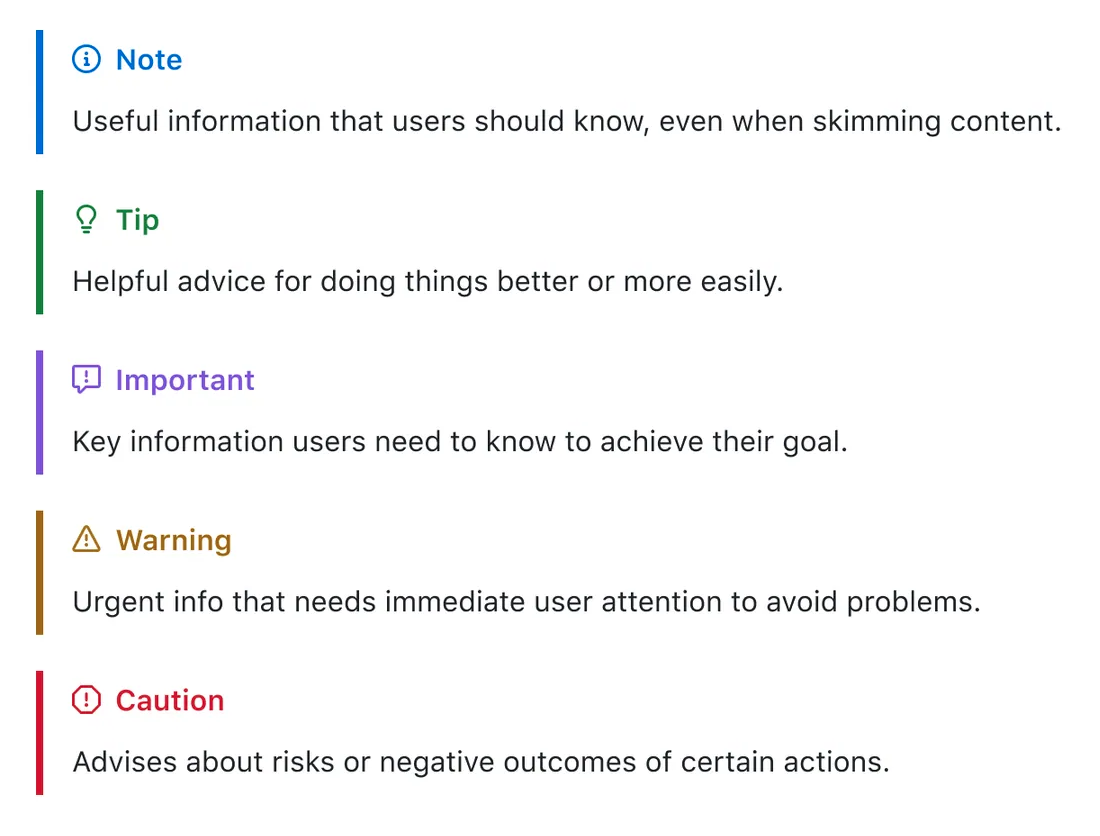
  <img alt="Alerts - GitHub Markdown extension" src="../images/github-markdown-alerts.png" width="60%" /><br />
  <i>Alerts - GitHub Markdown extension</i>
</p>

<p>Whenever I’ve written technical documentation using Markdown, there have been instance where I wanted to communicate something extra and for that I normally use blockquotes. Although a blockquote does give special emphasis to the text from the rest of the content, I’ve found myself wanting to do particular emphasis on something. For that, I’ve used different methods like using bold text, italic text, or emojis (📝, 🧭, 🚨). That said, I’ve never been quite satisfied with it. Fortunately, I bumped into GitHub Alerts today - <a href="https://docs.github.com/en/get-started/writing-on-github/getting-started-with-writing-and-formatting-on-github/basic-writing-and-formatting-syntax#alerts">https://docs.github.com/en/get-started/writing-on-github/getting-started-with-writing-and-formatting-on-github/basic-writing-and-formatting-syntax#alerts</a>, thanks to how Vadim Klimov is using it in his repo - <a href="https://github.com/vadimklimov/cpi-navigator">CPI Navigator</a>.</p>

<blockquote>
  <p>[!NOTE]
Alerts are a Markdown extension based on the blockquote syntax that you can use to emphasize critical information.</p>
</blockquote>

<p>What I like about it is that it is such a simple change that can make a big difference. It is a great way to highlight something and communicate importance of the information to the reader. I’m looking forward to using it in future content I create and I’ve started updating existing content to include this. Check out how it is being used in this exercise - <a href="https://github.com/SAP-samples/event-driven-integrations-codejam/tree/main/exercises/01-events-sap-ecosystem">https://github.com/SAP-samples/event-driven-integrations-codejam/tree/main/exercises/01-events-sap-ecosystem</a>.</p>]]></content><author><name></name></author><summary type="html"><![CDATA[Alerts - GitHub Markdown extension]]></summary></entry><entry><title type="html">Can a custom event trigger a process in SAP Build Process Automation?</title><link href="http://www.ajmaradiaga.com/Custom-event-trigger-SBPA/" rel="alternate" type="text/html" title="Can a custom event trigger a process in SAP Build Process Automation?" /><published>2024-05-30T00:00:00+00:00</published><updated>2024-05-30T00:00:00+00:00</updated><id>http://www.ajmaradiaga.com/Custom-event-trigger-SBPA</id><content type="html" xml:base="http://www.ajmaradiaga.com/Custom-event-trigger-SBPA/"><![CDATA[<p><strong>TLDR;</strong> No. Only predefined events can trigger a process in SAP Build Process Automation.</p>

<p>My last interactions with SAP Build Process Automation revolve around how you can trigger process by using events. We know that when configuring a process, one of the triggers can be set to start it is an event - <a href="https://help.sap.com/docs/build-process-automation/sap-build-process-automation/create-event-triggers">Create an event to start a process</a>. At the moment, the UI only let’s you select the events from a dropdown this is limited to some predefined business events.</p>

<p>By looking under the hood (Web browser, developer tools) I noticed that when setting an event trigger, there is an HTTP request made to the API. This request contains a payload with the following structure:</p>
<div class="language-json highlighter-rouge"><div class="highlight"><pre class="highlight"><code><span class="p">{</span><span class="w">
    </span><span class="nl">"name"</span><span class="p">:</span><span class="w"> </span><span class="s2">"MyCustomEventName"</span><span class="p">,</span><span class="w">
    </span><span class="nl">"identifier"</span><span class="p">:</span><span class="w"> </span><span class="s2">"mycustomeventname"</span><span class="p">,</span><span class="w">
    </span><span class="nl">"description"</span><span class="p">:</span><span class="w"> </span><span class="s2">""</span><span class="p">,</span><span class="w">
    </span><span class="nl">"header"</span><span class="p">:</span><span class="w"> </span><span class="p">{</span><span class="w">
        </span><span class="nl">"triggerableArtifactUids"</span><span class="p">:</span><span class="w"> </span><span class="p">[</span><span class="w">
            </span><span class="s2">"$.436i6204-0818-3t8o-q0if-h55t46k016gh"</span><span class="w">
        </span><span class="p">],</span><span class="w">
        </span><span class="nl">"sourceArtifactUid"</span><span class="p">:</span><span class="w"> </span><span class="s2">"sap.s4.beh.businesspartner.v1.BusinessPartner.Created.v1"</span><span class="w">
    </span><span class="p">}</span><span class="w">
</span><span class="p">}</span><span class="w">
</span></code></pre></div></div>

<p>The <code class="language-plaintext highlighter-rouge">sourceArtifactUid</code> field is set to <code class="language-plaintext highlighter-rouge">sap.s4.beh.businesspartner.v1.BusinessPartner.Created.v1</code>. This is the event that triggers the process. I’ve seen this value before when dealing with the SAP S/4HANA Cloud Business Partner events…. this is the value set in the type field of the event payload. Remember that <a href="https://ajmaradiaga.com/cloud-events-at-sap/">SAP has embraced the CloudEvents specification</a> and the type field will be included in the header (context) part of the event message. This got me wondering, what would happen if I set a different value in the <code class="language-plaintext highlighter-rouge">sourceArtifactUid</code> field in the request? Will it accept it as a trigger? Let’s try it.</p>

<div class="language-json highlighter-rouge"><div class="highlight"><pre class="highlight"><code><span class="p">{</span><span class="w">
    </span><span class="nl">"name"</span><span class="p">:</span><span class="w"> </span><span class="s2">"MyCustomEventName"</span><span class="p">,</span><span class="w">
    </span><span class="nl">"identifier"</span><span class="p">:</span><span class="w"> </span><span class="s2">"mycustomeventname"</span><span class="p">,</span><span class="w">
    </span><span class="nl">"description"</span><span class="p">:</span><span class="w"> </span><span class="s2">""</span><span class="p">,</span><span class="w">
    </span><span class="nl">"header"</span><span class="p">:</span><span class="w"> </span><span class="p">{</span><span class="w">
        </span><span class="nl">"triggerableArtifactUids"</span><span class="p">:</span><span class="w"> </span><span class="p">[</span><span class="w">
            </span><span class="s2">"$.436i6204-0818-3t8o-q0if-h55t46k016gh"</span><span class="w">
        </span><span class="p">],</span><span class="w">
        </span><span class="nl">"sourceArtifactUid"</span><span class="p">:</span><span class="w"> </span><span class="s2">"my.custom.event.v1"</span><span class="w">
    </span><span class="p">}</span><span class="w">
</span><span class="p">}</span><span class="w">
</span></code></pre></div></div>

<p>Will it work? Unfortunately, no. The service validates the value set as <code class="language-plaintext highlighter-rouge">sourceArtifactUid</code>. If it doesn’t match any of the predefined values, it will not accept it. This is a good thing, as it prevents you from setting a trigger that doesn’t exist. That said, it would be nice to have the ability to handle custom events that can trigger processes. I imagine that the custom event will need to be follow the CloudEvents specification but that wouldn’t be a big problem. It will be great to have this type of functionality as it would allow for more flexibility and automation in the platform, e.g. events from custom applications.</p>]]></content><author><name></name></author><summary type="html"><![CDATA[TLDR; No. Only predefined events can trigger a process in SAP Build Process Automation.]]></summary></entry><entry><title type="html">Dev Containers and Remote Tunnels 🚇</title><link href="http://www.ajmaradiaga.com/Remote-Tunnels/" rel="alternate" type="text/html" title="Dev Containers and Remote Tunnels 🚇" /><published>2024-03-20T00:00:00+00:00</published><updated>2024-03-20T00:00:00+00:00</updated><id>http://www.ajmaradiaga.com/Remote-Tunnels</id><content type="html" xml:base="http://www.ajmaradiaga.com/Remote-Tunnels/"><![CDATA[<p>The past few days I’ve been developing a couple of things that involve a <a href="https://pypi.org/project/solace-pubsubplus/#files">Python library</a> which has no binary available for my architecture (<code class="language-plaintext highlighter-rouge">arm64</code>). That said, there is a binary available for <code class="language-plaintext highlighter-rouge">amd64</code> and everything works just fine on that architecture. So I thought…. how can I develop locally but still being able to use that library only available for <code class="language-plaintext highlighter-rouge">amd64</code>? Given that I use Visual Studio Code, the next logical step is using a Dev Container.</p>

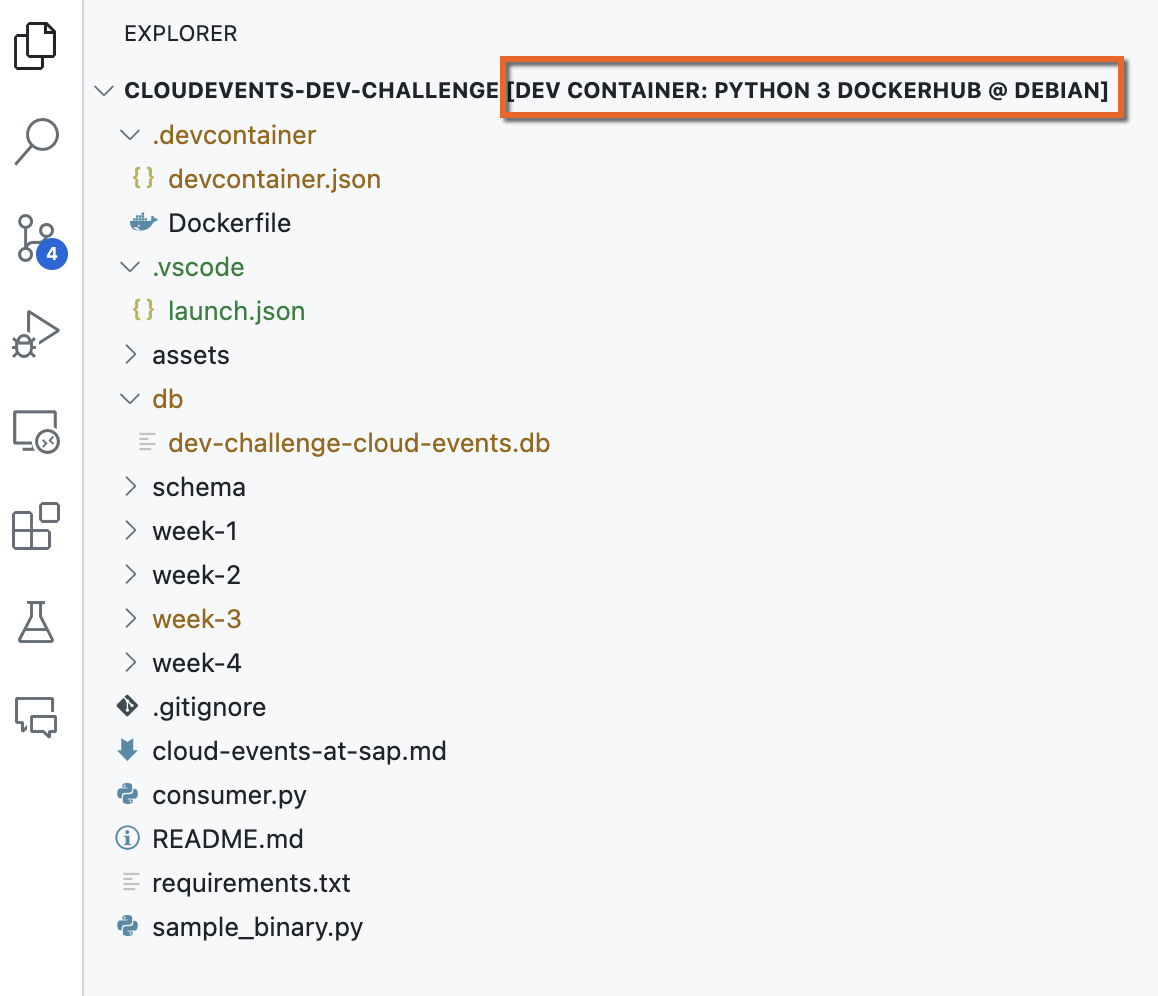
<p align="center">
  <img alt="Dev Container running remotely" src="../images/dctunnel-vscode.png" width="90%" /><br />
  <i>Dev Container running remotely</i>
</p>

<h2 id="dev-containers">Dev Containers</h2>

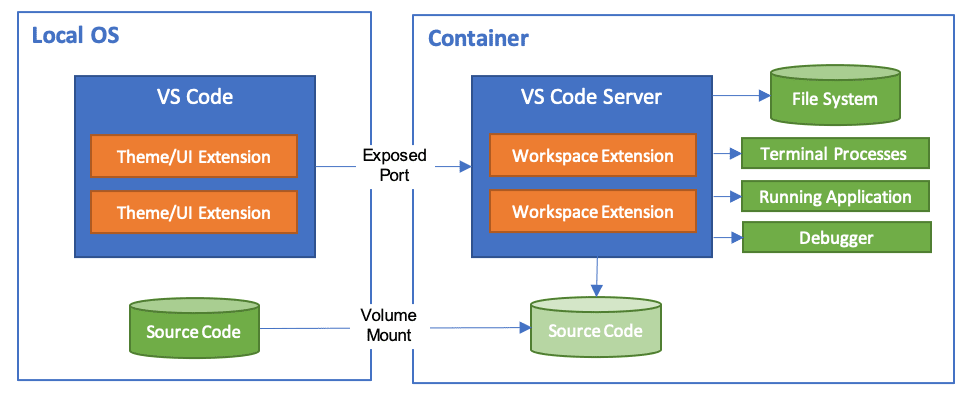
<p><em>The Visual Studio Code Dev Containers extension lets you use a container as a full-featured development environment. It allows you to open any folder inside (or mounted into) a container and take advantage of Visual Studio Code’s full feature set<sup id="fnref:1" role="doc-noteref"><a href="#fn:1" class="footnote" rel="footnote">1</a></sup></em>. In essence, you develop locally and your code runs in a local containerised environment.</p>

<p align="center">
  <img alt="Dev Container locally" src="../images/dctunnel-architecture-containers.png" width="90%" /><br />
  <i>Dev Container running locally</i>
</p>

<p>I created a <code class="language-plaintext highlighter-rouge">devcontainer.json</code> and specified that it should run on the amd64 architecture.</p>

<div class="language-docker highlighter-rouge"><div class="highlight"><pre class="highlight"><code><span class="k">FROM</span><span class="s"> --platform=linux/amd64 mcr.microsoft.com/devcontainers/python:1-3.12-bullseye</span>

<span class="k">CMD</span><span class="s"> ["echo", "The python:3.12.2-slim-bullseye image is working!"]</span>
</code></pre></div></div>

<p>Now, I was able to install the library and run the program using the local Dev Container running on the amd64 architecture (<a href="https://ajmaradiaga.com/TIL-Running-Linux-DevContainers-in-AppleSilicon/">–platform=linux/amd64</a>) but a new issue arrived. I was unable to install VS Code extensions in this local Dev Container. No matter what, not a single extension was installed in it. It wasn’t an issue with internet connectivity (proxies) and I wasn’t able to find an explanation on why this was happening. I’ve worked with Dev Containers in others projects and installing extensions on it just works.</p>

<blockquote>
  <p>After wasting more hours than what I would like to admit ⏳⏳⏳……</p>
</blockquote>

<p>This new issue got me thinking…. can the problem be that the Dev Container is running on a different architecture (<code class="language-plaintext highlighter-rouge">amd64</code>) than my local architecture (<code class="language-plaintext highlighter-rouge">arm64</code>)? What if the Dev Container runs on the same local architecture (<code class="language-plaintext highlighter-rouge">amd64</code> on <code class="language-plaintext highlighter-rouge">amd64</code>)? In the past, I’ve used the <a href="https://code.visualstudio.com/docs/remote/ssh">Remote Development using SSH</a> functionality to develop on a Raspberry PI and it works just fine… but you require SSH access and your code needs to live on that machine. That said, you can use this mechanism to run a <a href="https://code.visualstudio.com/docs/remote/ssh#_open-a-folder-on-a-remote-ssh-host-in-a-container">Dev Container there as well</a>.</p>

<p>Now, I recently learnt about an alternative….having your code locally but running a Dev Container remotely by using a tunnel. Enter <a href="https://code.visualstudio.com/docs/remote/tunnels">Remote Tunnels</a>.</p>

<h2 id="remote-tunnels">Remote Tunnels</h2>

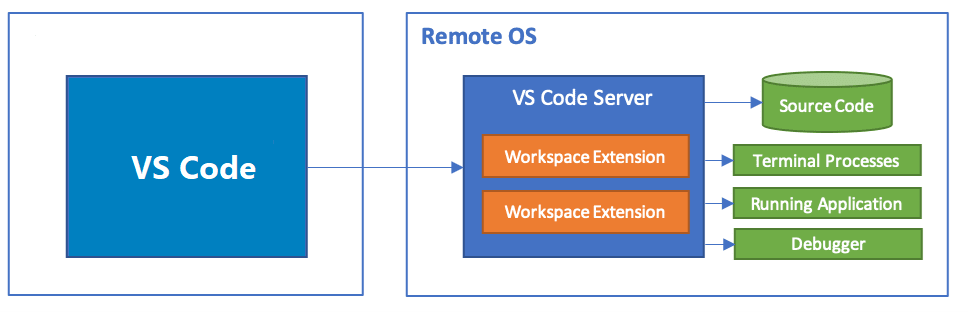
<p><em>The Visual Studio Code Remote - Tunnels extension lets you connect to a remote machine, like a desktop PC or virtual machine (VM), via a secure tunnel. You can connect to that machine from a VS Code client anywhere, without the requirement of SSH<sup id="fnref:2" role="doc-noteref"><a href="#fn:2" class="footnote" rel="footnote">2</a></sup></em>. The tunnel uses <a href="https://learn.microsoft.com/azure/developer/dev-tunnels/overview">Microsoft dev tunnels</a> to establish the communication between your local VS Code and the VS Code in the remote machine. For this, you will need to authenticate using a <a href="https://code.visualstudio.com/docs/remote/tunnels#_how-are-tunnels-secured">GitHub or Microsoft account</a>.</p>

<p align="center">
  <img alt="Dev Container locally" src="../images/dctunnel-tunnel-architecture.png" width="90%" /><br />
  <i>Dev Container running remotely</i>
</p>

<p>In order to set this up you need to have access to a remote machine/VM. In my case, a remote VM that runs the desired architecture (<code class="language-plaintext highlighter-rouge">amd64</code>). Fortunately, I have an <a href="https://docs.unraid.net/unraid-os/manual/vm-management/">Unraid server</a> at home, where I spun up a Debian VM and I can run a remote tunnel by using the VS Code CLI. It was a matter of downloading the CLI, install it, authenticate and of you go.</p>

<div class="language-bash highlighter-rouge"><div class="highlight"><pre class="highlight"><code><span class="nb">sudo </span>apt <span class="nb">install</span> ./&lt;file&gt;.deb

<span class="c"># Run tunnel</span>
code tunnel

<span class="c"># Run tunnel as a service</span>
code tunnel service <span class="nb">install</span>

<span class="c"># Check tunnel logs</span>
code tunnel logs
</code></pre></div></div>

<p>What’s great about this approach is that you don’t need SSH access in the remote machine and you can run the Dev Containers in the right architecture on the remote machine.</p>

<div class="footnotes" role="doc-endnotes">
  <ol>
    <li id="fn:1" role="doc-endnote">
      <p>Developing inside a container: <a href="https://code.visualstudio.com/docs/devcontainers/containers">link</a>. <a href="#fnref:1" class="reversefootnote" role="doc-backlink">&#8617;</a></p>
    </li>
    <li id="fn:2" role="doc-endnote">
      <p>Developing with Remote Tunnels: <a href="https://code.visualstudio.com/docs/remote/tunnels">link</a>. <a href="#fnref:2" class="reversefootnote" role="doc-backlink">&#8617;</a></p>
    </li>
  </ol>
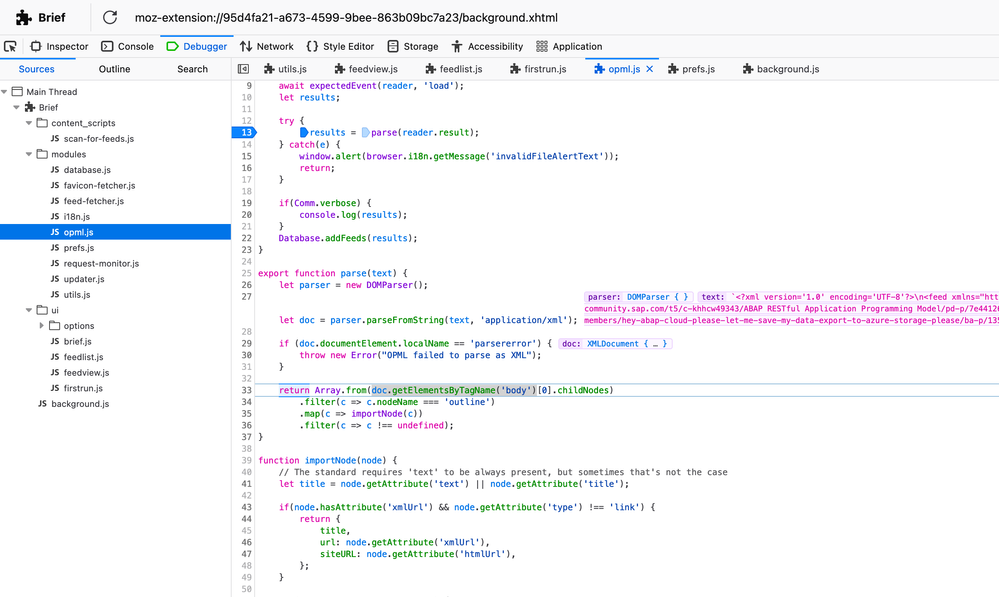
</div>]]></content><author><name></name></author><summary type="html"><![CDATA[The past few days I’ve been developing a couple of things that involve a Python library which has no binary available for my architecture (arm64). That said, there is a binary available for amd64 and everything works just fine on that architecture. So I thought…. how can I develop locally but still being able to use that library only available for amd64? Given that I use Visual Studio Code, the next logical step is using a Dev Container.]]></summary></entry><entry><title type="html">TIL - Debug a Firefox extension 🐞</title><link href="http://www.ajmaradiaga.com/TIL-debug-a-firefox-extension/" rel="alternate" type="text/html" title="TIL - Debug a Firefox extension 🐞" /><published>2024-03-11T00:00:00+00:00</published><updated>2024-03-11T00:00:00+00:00</updated><id>http://www.ajmaradiaga.com/TIL-debug-a-firefox-extension</id><content type="html" xml:base="http://www.ajmaradiaga.com/TIL-debug-a-firefox-extension/"><![CDATA[<p>An <a href="https://community.sap.com/t5/what-s-new/additional-sap-community-feeds/bc-p/13632953/highlight/true#M415">SAP community member</a> was facing an issue when trying to import an RSS feed in the <a href="https://github.com/brief-rss/brief">Brief Firefox extension</a>. I was curious to learn why it was failing which got me thinking… How can I <a href="https://extensionworkshop.com/documentation/develop/debugging/">debug an extension in Firefox</a>?</p>

<p>Steps:</p>

<ul>
  <li>Enter <code class="language-plaintext highlighter-rouge">about:debugging</code> in the URL bar.</li>
  <li>In the left-hand menu, click <code class="language-plaintext highlighter-rouge">This Firefox</code>.</li>
  <li>Click Inspect next to the extension.</li>
</ul>

<p align="center">
  <img alt="Debugging Brief Firefox extension" src="../images/debug-firefox-extension.png" width="100%" /><br />
  <i>Debugging Brief Firefox extension</i>
</p>

<p>Check out why it was failing… <a href="https://community.sap.com/t5/what-s-new/additional-sap-community-feeds/bc-p/13633765/highlight/true#M416">https://community.sap.com/t5/what-s-new/additional-sap-community-feeds/bc-p/13633765/highlight/true#M416</a>.</p>]]></content><author><name></name></author><summary type="html"><![CDATA[An SAP community member was facing an issue when trying to import an RSS feed in the Brief Firefox extension. I was curious to learn why it was failing which got me thinking… How can I debug an extension in Firefox?]]></summary></entry><entry><title type="html">TIL - Auto-assign an issue on GitHub 🤖</title><link href="http://www.ajmaradiaga.com/TIL-autoassign-an-issue-on-GitHub/" rel="alternate" type="text/html" title="TIL - Auto-assign an issue on GitHub 🤖" /><published>2024-03-08T00:00:00+00:00</published><updated>2024-03-08T00:00:00+00:00</updated><id>http://www.ajmaradiaga.com/TIL-autoassign-an-issue-on-GitHub</id><content type="html" xml:base="http://www.ajmaradiaga.com/TIL-autoassign-an-issue-on-GitHub/"><![CDATA[<p>I like the power of a nice simple <a href="https://docs.github.com/en/actions">GitHub action</a> to automate a specific activity in a repo. For example, I recently shared a repo (<a href="https://github.com/ajmaradiaga/feeds/">feeds</a>) where I “publish” various custom RSS feeds based on data from the SAP Community. In my case, I want to be automatically assigned to any new issue created in that repo, so I get notified whenever there is a new feed request (via an issue). I had some new requests (issues) open for a few days and it was only because I wasn’t aware of them. That’s why I need to automate it and not have the need to check the repo for new issues. For this, I’m using the Auto-assign issue action available in the GitHub action marketplace - <a href="https://github.com/marketplace/actions/auto-assign-issue">https://github.com/marketplace/actions/auto-assign-issue</a>.</p>

<blockquote>
  <p>You can find more details regarding the SAP Community feeds here: <a href="https://ajmaradiaga.com/RSS-feeds-in-SAP-Community/">Exploring the RSS feeds of the new SAP Community platform</a> and <a href="https://ajmaradiaga.com/additional-SAP-Community-feeds/">Additional SAP Community feeds 📡</a>.</p>
</blockquote>

<p>Below is the GitHub action that I added to the <a href="https://github.com/ajmaradiaga/feeds/blob/main/.github/workflows/autoassign.yml">feeds repo</a>.</p>
<div class="language-plaintext highlighter-rouge"><div class="highlight"><pre class="highlight"><code>name: Issue assignment
on:
  issues:
    types: [opened, unassigned]
jobs:
  auto-assign:
    runs-on: ubuntu-latest
    permissions:
      issues: write
    steps:
      - name: "Auto-assign issue"
        uses: pozil/auto-assign-issue@v1
        with:
          assignees: your_username
          numOfAssignee: 1
          allowSelfAssign: true
</code></pre></div></div>]]></content><author><name></name></author><summary type="html"><![CDATA[I like the power of a nice simple GitHub action to automate a specific activity in a repo. For example, I recently shared a repo (feeds) where I “publish” various custom RSS feeds based on data from the SAP Community. In my case, I want to be automatically assigned to any new issue created in that repo, so I get notified whenever there is a new feed request (via an issue). I had some new requests (issues) open for a few days and it was only because I wasn’t aware of them. That’s why I need to automate it and not have the need to check the repo for new issues. For this, I’m using the Auto-assign issue action available in the GitHub action marketplace - https://github.com/marketplace/actions/auto-assign-issue.]]></summary></entry><entry><title type="html">TIL - Running linux/amd64 Dev Containers on Apple Silicon</title><link href="http://www.ajmaradiaga.com/TIL-Running-Linux-DevContainers-in-AppleSilicon/" rel="alternate" type="text/html" title="TIL - Running linux/amd64 Dev Containers on Apple Silicon" /><published>2024-03-01T00:00:00+00:00</published><updated>2024-03-01T00:00:00+00:00</updated><id>http://www.ajmaradiaga.com/TIL-Running-Linux-DevContainers-in-AppleSilicon</id><content type="html" xml:base="http://www.ajmaradiaga.com/TIL-Running-Linux-DevContainers-in-AppleSilicon/"><![CDATA[<p>Today I learned how to force a <a href="https://code.visualstudio.com/docs/devcontainers/create-dev-container">VSCode Dev Container</a> to run on <code class="language-plaintext highlighter-rouge">amd64</code> architecture on my Mac. In essence, build a custom docker image by specifying a Dockerfile and in the FROM statement of the Dockerfile, specify the <code class="language-plaintext highlighter-rouge">--platform</code> flag. When you spin up the DevContainer it will automatically use the platform specified. If no platform is specified then the Dev Container will run on the platform of your OS, in my case <code class="language-plaintext highlighter-rouge">aarch64</code> and this was causing an issue when I was trying to run a Python program, as the program requires a <a href="https://pypi.org/project/solace-pubsubplus/#files">library</a> that’s only available for the <code class="language-plaintext highlighter-rouge">amd64</code> architecture.</p>

<p><strong>Dockerfile</strong></p>
<div class="language-docker highlighter-rouge"><div class="highlight"><pre class="highlight"><code><span class="k">FROM</span><span class="s"> --platform=linux/amd64 python:3.12.2-slim-bullseye</span>

<span class="k">CMD</span><span class="s"> ["echo", "The python:3.12.2-slim-bullseye image is working!"]</span>
</code></pre></div></div>

<p><strong>.devcontainer.json</strong></p>
<div class="language-jsonc highlighter-rouge"><div class="highlight"><pre class="highlight"><code><span class="p">{</span><span class="w">
	</span><span class="nl">"name"</span><span class="p">:</span><span class="w"> </span><span class="s2">"Python 3 DockerHub"</span><span class="p">,</span><span class="w">
	</span><span class="c1">// Or use a Dockerfile or Docker Compose file. More info: https://containers.dev/guide/dockerfile</span><span class="w">
	</span><span class="c1">// "image": "mcr.microsoft.com/devcontainers/python:1-3.12-bullseye",</span><span class="w">

	</span><span class="nl">"build"</span><span class="p">:{</span><span class="w">
		</span><span class="nl">"dockerfile"</span><span class="p">:</span><span class="w"> </span><span class="s2">"Dockerfile"</span><span class="w">
	</span><span class="p">},</span><span class="w">

	</span><span class="c1">// Features to add to the dev container. More info: https://containers.dev/features.</span><span class="w">
	</span><span class="c1">// "features": {},</span><span class="w">

	</span><span class="c1">// Use 'forwardPorts' to make a list of ports inside the container available locally.</span><span class="w">
	</span><span class="c1">// "forwardPorts": [],</span><span class="w">

	</span><span class="c1">// Use 'postCreateCommand' to run commands after the container is created.</span><span class="w">
	</span><span class="nl">"postCreateCommand"</span><span class="p">:</span><span class="w"> </span><span class="s2">"pip3 install --user -r requirements.txt"</span><span class="p">,</span><span class="w">

	</span><span class="c1">// Configure tool-specific properties.</span><span class="w">
	</span><span class="c1">// "customizations": {},</span><span class="w">

	</span><span class="c1">// Uncomment to connect as root instead. More info: https://aka.ms/dev-containers-non-root.</span><span class="w">
	</span><span class="c1">// "remoteUser": "root"</span><span class="w">
</span><span class="p">}</span><span class="w">
</span></code></pre></div></div>]]></content><author><name></name></author><summary type="html"><![CDATA[Today I learned how to force a VSCode Dev Container to run on amd64 architecture on my Mac. In essence, build a custom docker image by specifying a Dockerfile and in the FROM statement of the Dockerfile, specify the --platform flag. When you spin up the DevContainer it will automatically use the platform specified. If no platform is specified then the Dev Container will run on the platform of your OS, in my case aarch64 and this was causing an issue when I was trying to run a Python program, as the program requires a library that’s only available for the amd64 architecture.]]></summary></entry><entry><title type="html">CloudEvents at SAP 🌁</title><link href="http://www.ajmaradiaga.com/cloud-events-at-sap/" rel="alternate" type="text/html" title="CloudEvents at SAP 🌁" /><published>2024-02-27T00:00:00+00:00</published><updated>2024-02-27T00:00:00+00:00</updated><id>http://www.ajmaradiaga.com/cloud-events-at-sap</id><content type="html" xml:base="http://www.ajmaradiaga.com/cloud-events-at-sap/"><![CDATA[<p><strong>TLDR;</strong> <em>SAP is an <a href="https://github.com/cloudevents/spec/blob/main/docs/contributors.md">active contributor</a> to the CloudEvents specification and it has adopted the specification for describing event data in common formats to provide interoperability across its services/applications/systems. In the <a href="https://hub.sap.com/content-type/Events/events/packages">SAP Business Accelerator Hub</a>, you can find all the events exposed by a total of 17 different SAP services that publish events following the specification, including its flagship ERP products, <a href="https://hub.sap.com/package/SAPS4HANACloudBusinessEvents/event">SAP S/4HANA Cloud public edition</a> and <a href="https://hub.sap.com/package/SAPS4HANABusinessEvents/event">SAP S/4HANA</a>, exposing more than 600+ events combined. To enable seamless event-based integrations between SAP applications, SAP applications must conform to the CloudEvents specification. SAP also offers three services, part of the SAP Business Technology Platform (SAP BTP), that can help customers embrace event-driven architectures, these are: <a href="https://discovery-center.cloud.sap/serviceCatalog/sap-event-broker?region=all&amp;service_plan=standard&amp;commercialModel=cpea">SAP Event Broker for SAP cloud applications</a>, <a href="https://discovery-center.cloud.sap/serviceCatalog/event-mesh?region=all">SAP Event Mesh</a>, and <a href="https://discovery-center.cloud.sap/serviceCatalog/advanced-event-mesh?region=all">SAP Integration Suite, advanced event mesh</a>.</em></p>

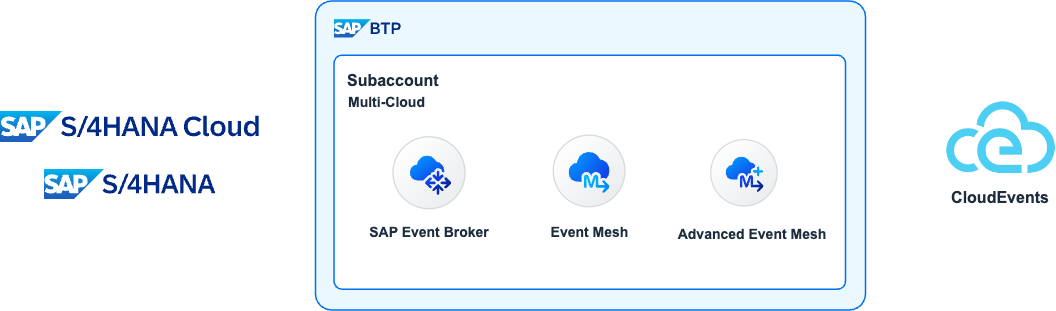
<p align="center">
  <img alt="CloudEvents at SAP" src="../images/CloudEvents-CloudEvents.drawio.png" width="100%" /><br />
  <i>CloudEvents at SAP</i>
</p>

<p>Before we dive into how CloudEvents have been adopted within SAP, we might need to talk a bit about what an Event-Driven architecture is and what a CloudEvent is as well. Let’s get started.</p>

<h2 id="event-driven-architectures">Event-Driven Architectures</h2>

<p>Long gone are the days when a system (aka <strong><em>target system</em></strong>) will constantly poll to check if there are any changes in another system, e.g. a new customer created in a master data system. Traditionally, the <strong><em>target system</em></strong> will only know this by programming a routine that will poll a file share and check for any files produced by this system or a web service exposed in the <strong><em>source system</em></strong>, every X minutes/hours/days. The expectation nowadays is that systems are integrated and that the data exchanged between these systems will be immediately available in the <strong><em>target system(s)</em></strong> if any data is created/changed in the <strong><em>source system</em></strong>.  Enter <strong>Event-Driven architectures</strong>.</p>

<p>An Event-Driven Architecture is a software architecture paradigm concerning the production and consumption of events. An event can be defined as a significant change in the state of an object within a system<sup id="fnref:1" role="doc-noteref"><a href="#fn:1" class="footnote" rel="footnote">1</a></sup>. For example, when a customer/supplier/employee (<strong><em>business object</em></strong>) is created/updated/deleted (<strong><em>action</em></strong>) in a system. Translating this to the SAP world, when a Business Partner is created/changed in SAP S/4HANA (<strong><em>source system</em></strong>), SAP S/4HANA can notify that there was a change in a business object and <strong><em>target system(s)</em></strong> interested in the Business Partner object can then react (do something about it) if they need to. This could be create/update/delete the object in their systems.</p>

<h3 id="how-do-source-and-target-systems-communicate">How do source and target systems communicate?</h3>

<p>Now, if the source system lets other systems know of any changes happening in its business objects, it will not be sustainable to create a new programming routine within the source system every time we want to notify a new target system of any changes. Traditionally we would have some form of middleware, e.g. SAP Cloud Integration, and configure our source system, an SAP S/4HANA system, to send notifications of these events to the middleware and then use the middleware to distribute these messages, e.g. we would add target system(s) as needed. Now, we are moving the problem from the source system to a sort of middleware but ideally, there will be a way for the source system to notify others without the need to make any changes. Enter the <strong>event broker</strong>.</p>

<p><em>An event broker is message-oriented middleware that enables the transmission of events between different components of a system, acting as a mediator between publishers and subscribers. It is the cornerstone of event-driven architecture, and all event-driven applications use some form of event broker to send and receive information</em><sup id="fnref:2" role="doc-noteref"><a href="#fn:2" class="footnote" rel="footnote">2</a></sup>.</p>

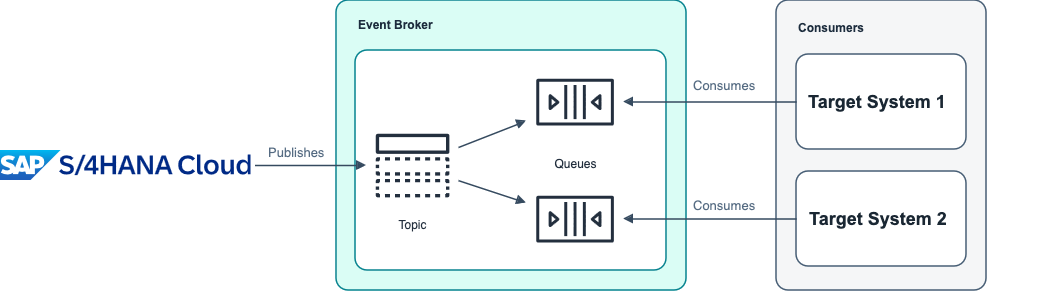
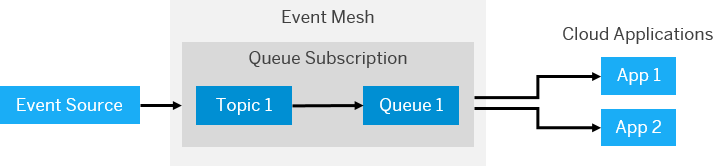
<p>By introducing an event broker in our landscapes, we can configure our source systems to <strong>publish</strong> their events to this message-oriented middleware. The source system will specify the class of the message (aka <strong>topic</strong>). Then, systems interested in the changes happening, e.g. in a particular business object in the source system, can <strong>subscribe</strong> to the event(s), via the event broker, by specifying the topic they are interested in. There are two keywords important here, publish and subscribe (PubSub), this is a well-known messaging pattern used to decouple systems/applications and allow asynchronous communication between them.</p>

<h3 id="what-is-the-pubsub-messaging-pattern">What is the PubSub messaging pattern?</h3>

<p><em>Publish-subscribe is a communication pattern that is defined by the decoupling of applications, where applications publish messages to an intermediary broker rather than communicating directly with consumers (as in point-to-point)</em><sup id="fnref:3" role="doc-noteref"><a href="#fn:3" class="footnote" rel="footnote">3</a></sup>. In a way, publishers and consumers do not need to know each other; they simply publish (produce) or consume (receive) the events. When following this messaging pattern we move from, the traditional polling mechanism to know if there have been any changes in the source system, to reacting to real-time events (notifications) the moment something happens in the source system.</p>

<p align="center">
  <img alt="PubSub messaging pattern" src="../images/CloudEvents-PubSub.drawio.png" width="100%" /><br />
  <i>PubSub messaging pattern</i>
</p>

<p>We mentioned before how target systems can subscribe to events by specifying a topic they are interested in…. some event brokers will allow subscribers to subscribe to topics by using wildcards (*) and they will be able to receive events for different topics. For example, let’s assume we have an SAP S/4HANA with the name <code class="language-plaintext highlighter-rouge">S4D</code> and it publishes the Business Partner create and change on the following topics: <code class="language-plaintext highlighter-rouge">sap/S4HANAOD/S4D/ce/sap/s4/beh/businesspartner/v1/BusinessPartner/Created/v1</code> and <code class="language-plaintext highlighter-rouge">sap/S4HANAOD/S4D/ce/sap/s4/beh/businesspartner/v1/BusinessPartner/Changed/v1</code>. A subscriber system could subscribe to both topics using a wildcard, e.g. <code class="language-plaintext highlighter-rouge">sap/S4HANAOD/S4D/ce/sap/s4/beh/businesspartner/v1/BusinessPartner/*/v1</code> and receive the messages for both event types.</p>

<blockquote>
  <p>SAP offers different services that can act as event brokers. We will discuss this further in the <a href="./cloud-event-at-sap.md#saps-event-driven-portfolio">SAP’s event-driven portfolio</a> section.</p>
</blockquote>

<p>With many systems in our landscapes and each one being developed by different vendors/teams, it would be good if there was a standard way of structuring these events to simplify how systems create/handle/process these messages right? Enter <a href="https://CloudEvents.io/">CloudEvents</a>.</p>

<h2 id="what-is-cloudevents">What is CloudEvents?</h2>

<p align="center">
  <img alt="CloudEvents" src="../images/CloudEvents-logo.png" width="15%" /><br />
  <i>CloudEvents</i>
</p>

<p>Today’s system landscapes are very complex and we need to deal with many systems communicating with each other, ideally as close to real-time as possible. Nowadays, a system can publish events to notify other systems of the changes happening within the objects of their system. Given that we are talking of many systems, ideally, there will be a common way of describing the data produced by these systems. The CloudEvents specification can help us with this. We can leverage it to provide a consistent way for how our systems can communicate with others about these events.</p>

<p>As mentioned on the <a href="https://CloudEvents.io/">CloudEvents website</a>… <em>CloudEvents is a specification for describing event data in a common way. It’s goal is to simplify event declaration and delivery across services, platforms and beyond! The specification is now under the <a href="https://cncf.io/">Cloud Native Computing Foundation</a></em>.</p>

<p>Below is an example of what a CloudEvent message will look like:</p>
<div class="language-json highlighter-rouge"><div class="highlight"><pre class="highlight"><code><span class="p">{</span><span class="w">
  </span><span class="nl">"specversion"</span><span class="w"> </span><span class="p">:</span><span class="w"> </span><span class="s2">"1.0"</span><span class="p">,</span><span class="w">
  </span><span class="nl">"type"</span><span class="w"> </span><span class="p">:</span><span class="w"> </span><span class="s2">"com.github.pull_request.opened"</span><span class="p">,</span><span class="w">
  </span><span class="nl">"source"</span><span class="w"> </span><span class="p">:</span><span class="w"> </span><span class="s2">"https://github.com/cloudevents/spec/pull"</span><span class="p">,</span><span class="w">
  </span><span class="nl">"subject"</span><span class="w"> </span><span class="p">:</span><span class="w"> </span><span class="s2">"123"</span><span class="p">,</span><span class="w">
  </span><span class="nl">"id"</span><span class="w"> </span><span class="p">:</span><span class="w"> </span><span class="s2">"A234-1234-1234"</span><span class="p">,</span><span class="w">
  </span><span class="nl">"time"</span><span class="w"> </span><span class="p">:</span><span class="w"> </span><span class="s2">"2018-04-05T17:31:00Z"</span><span class="p">,</span><span class="w">
  </span><span class="nl">"comexampleextension1"</span><span class="w"> </span><span class="p">:</span><span class="w"> </span><span class="s2">"value"</span><span class="p">,</span><span class="w">
  </span><span class="nl">"comexampleothervalue"</span><span class="w"> </span><span class="p">:</span><span class="w"> </span><span class="mi">5</span><span class="p">,</span><span class="w">
  </span><span class="nl">"datacontenttype"</span><span class="w"> </span><span class="p">:</span><span class="w"> </span><span class="s2">"text/xml"</span><span class="p">,</span><span class="w">
  </span><span class="nl">"data"</span><span class="w"> </span><span class="p">:</span><span class="w"> </span><span class="s2">"&lt;much wow=</span><span class="se">\"</span><span class="s2">xml</span><span class="se">\"</span><span class="s2">/&gt;"</span><span class="w">
</span><span class="p">}</span><span class="w">
</span></code></pre></div></div>

<p>You’ll notice that the example above is composed of many attributes. These attributes describe the event and are independent of the event data. Meaning that we can somehow process/inspect the event without needing to process its data. Now, let’s dive a bit into the message itself.</p>

<blockquote>
  <p>For more information on the history, development and design rationale behind the specification, see the <a href="https://github.com/cloudevents/spec/blob/v1.0.2/cloudevents/primer.md">CloudEvents Primer</a> document.</p>
</blockquote>

<h2 id="cloudevents-message-format">CloudEvents message format</h2>

<p>A CloudEvent message is mainly composed of context attributes and data.</p>

<h3 id="context-attributes">Context Attributes</h3>

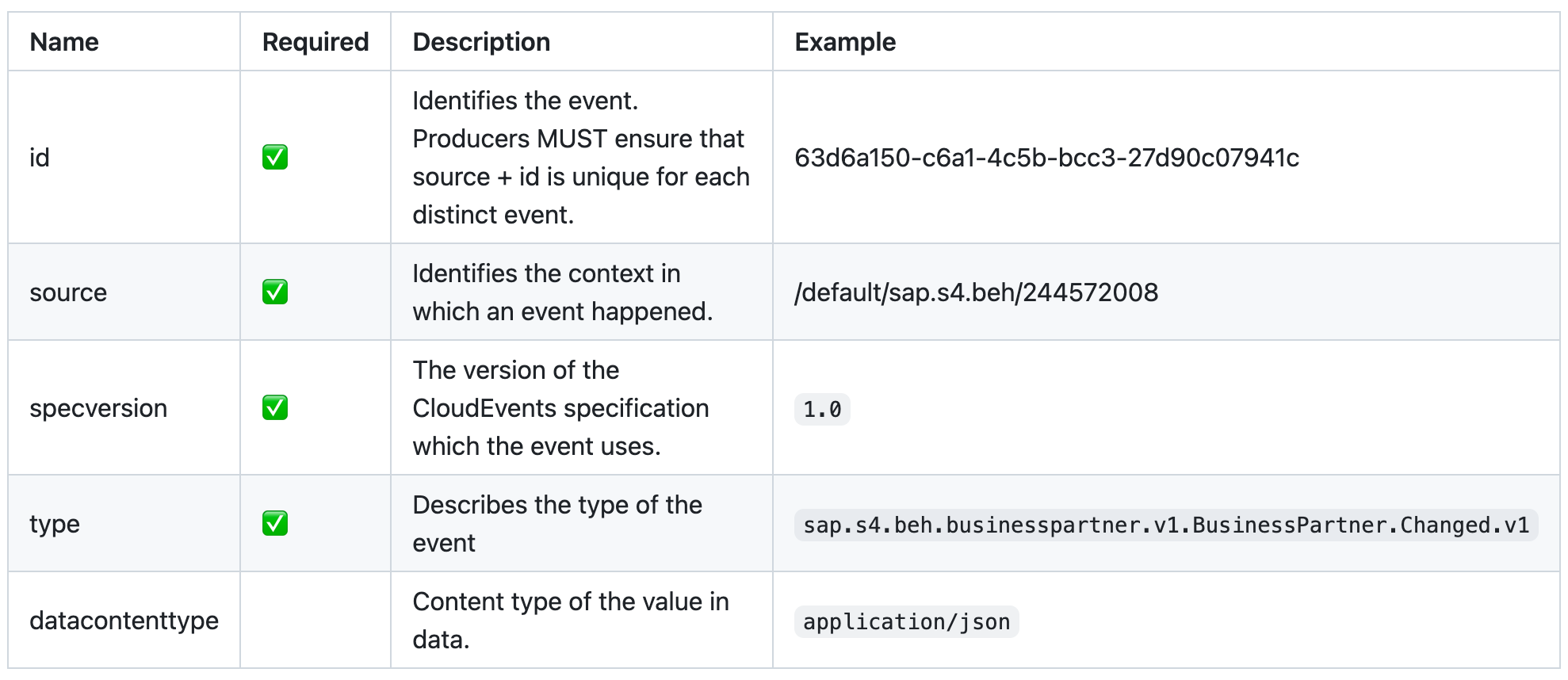
<p>A number of attributes can be included within the message, these attributes are known as <a href="https://github.com/cloudevents/spec/blob/v1.0.2/cloudevents/spec.md#context-attributes">Context Attributes</a> and the idea is that these context attributes can be used to describe the event. We can think of these context attributes as the header information of our event. Let’s explore some of the attributes available.</p>

<p align="center">
  <img alt="CloudEvent context attributes" src="../images/ce-context-attributes-table.png" width="90%" /><br />
  <i>CloudEvent context attributes</i>
</p>

<!-- | Name | Required | Description | Example |
| ---- | ----- | ---- | --- |
| id | ✅ | Identifies the event. Producers MUST ensure that source + id is unique for each distinct event. | 63d6a150-c6a1-4c5b-bcc3-27d90c07941c |
| source | ✅ | Identifies the context in which an event happened. | /default/sap.s4.beh/244572008 |
| specversion | ✅ | The version of the CloudEvents specification which the event uses. | `1.0` |
| type | ✅ | Describes the type of the event | `sap.s4.beh.businesspartner.v1.BusinessPartner.Changed.v1` |
| datacontenttype | | Content type of the value in data. | `application/json` | -->

<h4 id="extension-context-attributes">Extension Context Attributes</h4>
<p>A CloudEvent message may also include additional context attributes, which are not defined as part of the specification. These additional attributes are known as “extension attributes” and can be used by the producer systems to include additional metadata to an event, similar to how we can use HTTP custom headers.</p>

<p>For example, in the <a href="https://hub.sap.com/event/SAPDigitalVehicleHubBusinessEvents_SAPDigitalVehicleHubBusinessEvents">SAP Digital Vehicle Hub Business Events package</a>, we can see that the event raised when a vehicle changes - <code class="language-plaintext highlighter-rouge">sap.dmo.dvh.Vehicle.Changed.v1</code>, contains the extension context attribute <code class="language-plaintext highlighter-rouge">sappassport</code>, which is an SAP specific tracing identifier.</p>

<div class="language-json highlighter-rouge"><div class="highlight"><pre class="highlight"><code><span class="p">{</span><span class="w">
  </span><span class="nl">"specversion"</span><span class="p">:</span><span class="w"> </span><span class="s2">"1.0"</span><span class="p">,</span><span class="w">
  </span><span class="nl">"type"</span><span class="p">:</span><span class="w"> </span><span class="s2">"sap.dmo.dvh.Vehicle.Changed.v1"</span><span class="p">,</span><span class="w">
  </span><span class="nl">"source"</span><span class="p">:</span><span class="w"> </span><span class="s2">"/eu10/sap.dmo.dvh"</span><span class="p">,</span><span class="w">
  </span><span class="nl">"subject"</span><span class="p">:</span><span class="w"> </span><span class="s2">"808E6E30B65149978A443429B29FB300"</span><span class="p">,</span><span class="w">
  </span><span class="nl">"id"</span><span class="p">:</span><span class="w"> </span><span class="s2">"a823e884-5edc-4194-a81a-f3a3632417ee"</span><span class="p">,</span><span class="w">
  </span><span class="nl">"time"</span><span class="p">:</span><span class="w"> </span><span class="s2">"2018-04-08 08:31:00"</span><span class="p">,</span><span class="w">
  </span><span class="nl">"datacontenttype"</span><span class="p">:</span><span class="w"> </span><span class="s2">"application/json"</span><span class="p">,</span><span class="w">
  </span><span class="nl">"sappassport"</span><span class="p">:</span><span class="w"> </span><span class="s2">"string"</span><span class="p">,</span><span class="w">
  </span><span class="err">....</span><span class="w">
</span><span class="p">}</span><span class="w">
</span></code></pre></div></div>

<h3 id="data">Data</h3>

<p>A CloudEvent message may include a payload but this is not required. If included it will be in the format specified in the <code class="language-plaintext highlighter-rouge">datacontenttype</code> context attribute. Although it is not required, we will generally have a payload in messages. Below we can see an example of an event message that contains a payload. In this case, a Business Partner changed event generated by an SAP S/4HANA Cloud Public Edition.</p>

<div class="language-json highlighter-rouge"><div class="highlight"><pre class="highlight"><code><span class="p">{</span><span class="w">
    </span><span class="nl">"type"</span><span class="p">:</span><span class="w"> </span><span class="s2">"sap.s4.beh.businesspartner.v1.BusinessPartner.Changed.v1"</span><span class="p">,</span><span class="w">
    </span><span class="nl">"specversion"</span><span class="p">:</span><span class="w"> </span><span class="s2">"1.0"</span><span class="p">,</span><span class="w">
    </span><span class="nl">"source"</span><span class="p">:</span><span class="w"> </span><span class="s2">"/default/sap.s4.beh/244572008"</span><span class="p">,</span><span class="w">
    </span><span class="nl">"id"</span><span class="p">:</span><span class="w"> </span><span class="s2">"63d6a150-c6a1-4c5b-bcc3-27d90c07941c"</span><span class="p">,</span><span class="w">
    </span><span class="nl">"time"</span><span class="p">:</span><span class="w"> </span><span class="s2">"2024-02-26T10:53:06Z"</span><span class="p">,</span><span class="w">
    </span><span class="nl">"datacontenttype"</span><span class="p">:</span><span class="w"> </span><span class="s2">"application/json"</span><span class="p">,</span><span class="w">
    </span><span class="nl">"data"</span><span class="p">:</span><span class="w"> </span><span class="p">{</span><span class="w">
        </span><span class="nl">"BusinessPartner"</span><span class="p">:</span><span class="w"> </span><span class="s2">"1000667"</span><span class="w">
    </span><span class="p">}</span><span class="w">
</span><span class="p">}</span><span class="w">
</span></code></pre></div></div>

<blockquote>
  <p>Check out the Business Partner changed event in the SAP Business Accelerator Hub - <a href="https://hub.sap.com/event/CE_BUSINESSPARTNEREVENTS/resource">https://hub.sap.com/event/CE_BUSINESSPARTNEREVENTS/resource</a>.</p>
</blockquote>

<h2 id="saps-adoption-of-cloudevents">SAP’s adoption of CloudEvents</h2>

<p>SAP is an <a href="https://github.com/cloudevents/spec/blob/main/docs/contributors.md">active contributor</a> to the CloudEvents specification and one of its many <a href="https://cloudevents.io/">adopters</a>. Evidence of that is the different products (<a href="https://hub.sap.com/content-type/Events/events/packages">event packages</a>) that we can find documented in the <a href="https://hub.sap.com/content-type/Events/events/events">SAP Business Accelerator Hub &gt; Events category</a>.</p>

<p>The products listed below document their events in the form of event packages in the <a href="https://hub.sap.com/">SAP Business Accelerator Hub</a>. All their events follow the CloudEvents specification:</p>
<ul>
  <li>SAP Agricultural Origination Portal</li>
  <li>SAP Batch Release Hub for Life Sciences</li>
  <li>SAP Cell and Gene Therapy Orchestration</li>
  <li>SAP Cloud for Utilities Foundation</li>
  <li>SAP Digital Vehicle Hub</li>
  <li>SAP GRC Cloud - Issue Management and Remediation Service</li>
  <li>SAP Industry Process Framework</li>
  <li>SAP Intelligent Clinical Supply Management for Operations</li>
  <li>SAP Intelligent Clinical Supply Management for Planning</li>
  <li>SAP Landscape Management Cloud</li>
  <li>SAP Marketing Cloud</li>
  <li>SAP Order Management Foundation</li>
  <li>SAP S/4HANA</li>
  <li>SAP S/4HANA Cloud Public Edition</li>
  <li>SAP S/4HANA Utilities for Customer Engagement</li>
  <li>SAP S/4HANA for Procurement Planning Cloud</li>
  <li>SAP Subscription Billing</li>
</ul>

<p>SAP’s flagship ERP products, SAP S/4HANA Cloud Public edition and SAP S/4HANA, expose more than 600+ events combined. As you might have noticed from the events that we use as examples above, these events follow the CloudEvents specification. Below we can see the Business Partner Created event generated by an SAP S/4HANA Cloud Public Edition and we can see how it follows the CloudEvents specification.</p>

<div class="language-json highlighter-rouge"><div class="highlight"><pre class="highlight"><code><span class="p">{</span><span class="w">
    </span><span class="nl">"type"</span><span class="p">:</span><span class="w"> </span><span class="s2">"sap.s4.beh.businesspartner.v1.BusinessPartner.Created.v1"</span><span class="p">,</span><span class="w">
    </span><span class="nl">"specversion"</span><span class="p">:</span><span class="w"> </span><span class="s2">"1.0"</span><span class="p">,</span><span class="w">
    </span><span class="nl">"source"</span><span class="p">:</span><span class="w"> </span><span class="s2">"/default/sap.s4.beh/244572008"</span><span class="p">,</span><span class="w">
    </span><span class="nl">"id"</span><span class="p">:</span><span class="w"> </span><span class="s2">"194780e0-b5db-1ede-b58a-4550178dff9e"</span><span class="p">,</span><span class="w">
    </span><span class="nl">"time"</span><span class="p">:</span><span class="w"> </span><span class="s2">"2024-02-26T09:50:00Z"</span><span class="p">,</span><span class="w">
    </span><span class="nl">"datacontenttype"</span><span class="p">:</span><span class="w"> </span><span class="s2">"application/json"</span><span class="p">,</span><span class="w">
    </span><span class="nl">"data"</span><span class="p">:</span><span class="w"> </span><span class="p">{</span><span class="w">
        </span><span class="nl">"BusinessPartner"</span><span class="p">:</span><span class="w"> </span><span class="s2">"1000667"</span><span class="w">
    </span><span class="p">}</span><span class="w">
</span><span class="p">}</span><span class="w">
</span></code></pre></div></div>

<h3 id="kyma">Kyma</h3>

<p align="center">
  <img alt="Kyma runtime logo" src="../images/kyma-runtime.png" width="15%" /><br />
  <i>Kyma runtime</i>
</p>

<p>Kyma contains an <a href="https://kyma-project.io/#/06-modules/README">Eventing module</a>, which provides functionality to publish and subscribe to CloudEvents. It follows the PubSub messaging pattern and all events in Kyma conform to the CloudEvents specification<sup id="fnref:5" role="doc-noteref"><a href="#fn:5" class="footnote" rel="footnote">4</a></sup>. At the moment, NATS (provided by the NATS module) and SAP Event Mesh are <a href="https://help.sap.com/docs/btp/sap-business-technology-platform/choose-backend-for-kyma-eventing">supported as backends</a> for eventing and it is recommended to use the CloudEvents specification for sending and receiving events. Even the legacy events are automatically converted to CloudEvents.</p>

<h2 id="saps-event-driven-portfolio">SAP’s event-driven portfolio</h2>

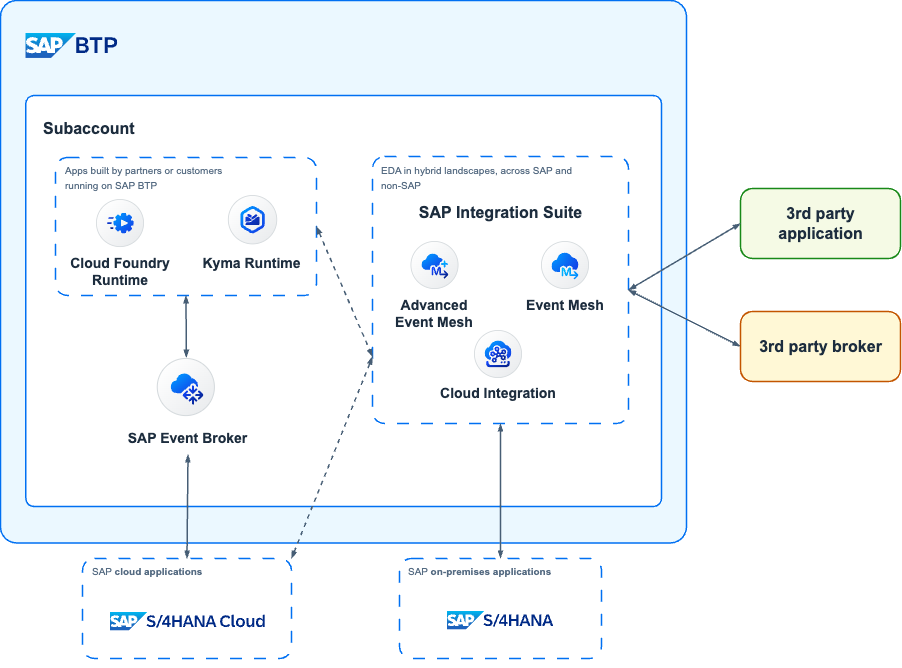
<p align="center">
  <img alt="SAP event-driven portfolio" src="../images/CloudEvents-EDA.drawio.png" width="85%" /><br />
  <i>SAP event-driven portfolio</i>
</p>

<p>SAP offers various services that can help customers embrace event-driven architectures. The different offerings can meet customers where they are in their EDA adoption/implementation journey. These are:</p>
<ul>
  <li>SAP Event Broker for SAP cloud applications</li>
  <li>SAP Event Mesh</li>
  <li>SAP Integration Suite, advanced event mesh</li>
</ul>

<h3 id="sap-event-broker-for-sap-cloud-applications"><a href="https://discovery-center.cloud.sap/serviceCatalog/sap-event-broker?region=all&amp;service_plan=standard&amp;commercialModel=cpea">SAP Event Broker for SAP cloud applications</a></h3>

<p align="center">
  <img alt="SAP Event Broker for SAP cloud applications logo" src="../images/sap-event-broker.png" width="15%" /><br />
  <i>SAP Event Broker for SAP cloud applications</i>
</p>

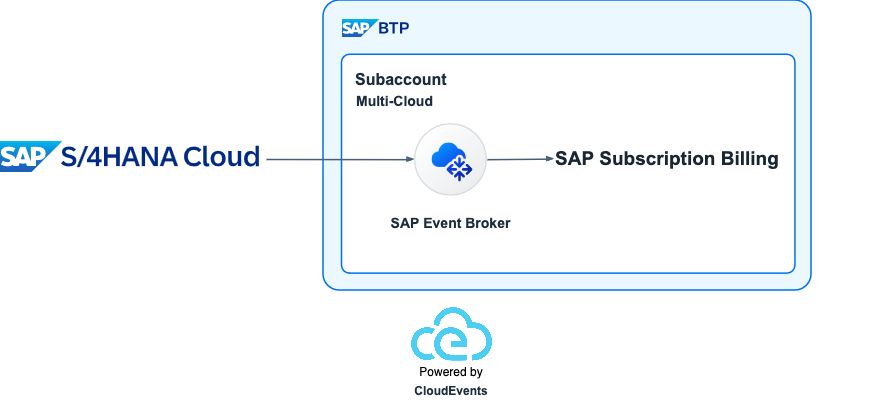
<p>SAP Event Broker is the latest service released by SAP that focuses on event-driven architecture and it supports event-based integration between SAP cloud and BTP-based applications. It is a fully managed cloud service that allows SAP cloud applications to communicate asynchronously through events. Meaning it can be used to distribute events between SAP cloud applications. For example, this service can be leveraged to enable seamless integration between <a href="https://help.sap.com/docs/CLOUD_TO_CASH_OD/559eeb1cc256428c9bb3b9cf9f3480ba/6407b895ff9f4be6a4d417db2226eae4.html?locale=en-US">SAP S/4HANA Cloud public edition and SAP Subscription Billing</a>. When an integration scenario leverages SAP Event Broker, it eliminates having to configure an event storage or infrastructure such as customer-defined topics or queues to enable the event-based integration between systems.</p>

<p align="center">
  <img alt="Integration between SAP S/4HANA Cloud and SAP Subscription Billing" src="../images/CloudEvents-SeamlessIntegration.drawio.png" width="80%" /><br />
  <i>Integration between SAP S/4HANA Cloud and SAP Subscription Billing</i>
</p>

<p>CloudEvents are first-class citizens in SAP Event Broker, as events that are distributed between SAP cloud applications using SAP Event Broker all conform to the <a href="https://github.com/cloudevents/spec/blob/v1.0.2/cloudevents/spec.md">CloudEvent Specification</a><sup id="fnref:4" role="doc-noteref"><a href="#fn:4" class="footnote" rel="footnote">5</a></sup>.</p>

<p>If all your event needs are within the SAP cloud world, e.g. exchange events between SAP cloud applications and SAP BTP, this service can fulfill your needs.</p>

<h3 id="sap-event-mesh"><a href="https://discovery-center.cloud.sap/serviceCatalog/event-mesh?region=all">SAP Event Mesh</a></h3>

<p align="center">
  <img alt="SAP Event Mesh logo" src="../images/event-mesh.png" width="15%" /><br />
  <i>SAP Event Mesh</i>
</p>

<p>SAP Event Mesh allows applications to communicate through asynchronous events. It can be used to publish and consume business events from SAP and non-SAP sources across hybrid landscapes from the digital core (ERP products, e.g. SAP S/4HANA Cloud public edition and SAP S/4HANA) to extension applications through event-driven architecture. It is a fully managed <a href="https://help.sap.com/docs/event-mesh/event-mesh/event-mesh-default-plan-concepts?locale=en-US">centralised event-oriented</a> service part of SAP BTP.</p>

<p align="center">
  <img alt="Centralised service" src="../images/event-mesh-diagram.png" width="85%" /><br />
  <i>Centralised service</i>
</p>

<p>The <a href="https://help.sap.com/docs/event-mesh/event-mesh/rest-apis-for-events?locale=en-US">service supports the use of REST APIs for Events</a>, for publishing and consuming events that are compliant with the CloudEvents specification. Related to event-based integrations, events that flow through SAP Event Mesh between SAP applications must all conform to the CloudEvents specification.</p>

<blockquote>
  <p>You can check out how to enable the consumption of SAP S/4HANA Cloud public edition events in your SAP BTP account - https://youtu.be/4LspIL3NxqQ</p>
</blockquote>

<h3 id="sap-integration-suite-advanced-event-mesh-aem"><a href="https://discovery-center.cloud.sap/serviceCatalog/advanced-event-mesh?region=all">SAP Integration Suite, advanced event mesh</a> (AEM)</h3>

<p align="center">
  <img alt="SAP Integration Suite, advanced event mesh logo" src="../images/advanced-event-mesh.png" width="15%" /><br />

  <i>SAP Integration Suite, advanced event mesh</i>
</p>

<p>SAP Integration Suite, advanced event mesh (AEM) is a complete event streaming, event management, and monitoring platform that incorporates best practices, expertise, and technology for event-driven architecture (EDA) on a single platform. With AEM you can deploy event broker services, create event meshes, and optimize and monitor your event-driven system.</p>

<p>AEM offers these categories of services:</p>
<ul>
  <li><strong>Event Streaming</strong>: It provides event streaming services and gives you access to event broker services that provide advanced features like the publish-subscribe messaging pattern, queuing, streaming, replay, and request-reply, while doing all the heavy lifting to dynamically deploy, upgrade, patch, and operate the service. It extends beyond the cloud and supports infrastructure and EDAs across hybrid cloud solutions and your on-premises deployments.
    <blockquote>
      <p>Event brokers can be deployed to: public clouds administered by SAP (Public Regions or Dedicated Regions) and customer’s own regions in the cloud or on-premises (Customer-Controlled Regions)</p>
    </blockquote>
  </li>
  <li>
    <p><strong>Event Management</strong>: It provides event management services. The Event Portal provides powerful tools to create, design, share, and manage various aspects of your EDA based on event brokers or other streaming technologies. It fully supports the AsyncAPI 2.0.0 specification so that you can generate code, documentation, validate events, and apply API management policies for applications in your EDA.</p>

    <blockquote>
      <p>You might have noticed that some event specification in the SAP Business Accelerator Hub are documented using the AsyncAPI specification, e.g. <a href="https://hub.sap.com/event/CE_MARKETINGCAMPAIGNEVENTS/overview">Marketing Campaign Events</a> part of SAP Marketing Cloud.</p>
    </blockquote>
  </li>
  <li><strong>Event Monitoring and Insights</strong>: Availability out-of-the-box of dashboards and easy-to-understand visualizations based on historical and real-time metrics, and timely notifications about the event broker services deployed.</li>
</ul>

<p>Similar to SAP Event Mesh, it can be used to publish and consume business events from SAP and non-SAP sources across hybrid landscapes. Meaning, if your event data needs to exit the SAP cloud world, you can use any of these two services.</p>

<hr />

<p>Thanks for making it this far, we’ve covered a lot in this blog post and I hope it gives you a general understanding of CloudEvents, its importance in the SAP world, how it can enable integration across SAP applications and the different SAP offerings that can enable your EDA journey.</p>

<div class="footnotes" role="doc-endnotes">
  <ol>
    <li id="fn:1" role="doc-endnote">
      <p>Event-Driven architecture: <a href="https://en.wikipedia.org/wiki/Event-driven_architecture">link</a> <a href="#fnref:1" class="reversefootnote" role="doc-backlink">&#8617;</a></p>
    </li>
    <li id="fn:2" role="doc-endnote">
      <p>What is an event broker?: <a href="https://solace.com/what-is-an-event-broker/">link</a>. <a href="#fnref:2" class="reversefootnote" role="doc-backlink">&#8617;</a></p>
    </li>
    <li id="fn:3" role="doc-endnote">
      <p>What is the publish-subscribe messaging pattern?: <a href="https://solace.com/blog/publish-subscribe-messaging-pattern/">link</a> <a href="#fnref:3" class="reversefootnote" role="doc-backlink">&#8617;</a></p>
    </li>
    <li id="fn:5" role="doc-endnote">
      <p>Eventing module in Kyma: <a href="https://kyma-project.io/#/eventing-manager/user/README">link</a>. <a href="#fnref:5" class="reversefootnote" role="doc-backlink">&#8617;</a></p>
    </li>
    <li id="fn:4" role="doc-endnote">
      <p>SAP Event-Driven integrations: <a href="https://help.sap.com/docs/event-broker/event-broker-service-guide/event-driven-integrations?locale=en-US%3Fversion%3DCloud">link</a>. <a href="#fnref:4" class="reversefootnote" role="doc-backlink">&#8617;</a></p>
    </li>
  </ol>
</div>]]></content><author><name></name></author><summary type="html"><![CDATA[TLDR; SAP is an active contributor to the CloudEvents specification and it has adopted the specification for describing event data in common formats to provide interoperability across its services/applications/systems. In the SAP Business Accelerator Hub, you can find all the events exposed by a total of 17 different SAP services that publish events following the specification, including its flagship ERP products, SAP S/4HANA Cloud public edition and SAP S/4HANA, exposing more than 600+ events combined. To enable seamless event-based integrations between SAP applications, SAP applications must conform to the CloudEvents specification. SAP also offers three services, part of the SAP Business Technology Platform (SAP BTP), that can help customers embrace event-driven architectures, these are: SAP Event Broker for SAP cloud applications, SAP Event Mesh, and SAP Integration Suite, advanced event mesh.]]></summary></entry><entry><title type="html">Additional SAP Community feeds 📡</title><link href="http://www.ajmaradiaga.com/additional-SAP-Community-feeds/" rel="alternate" type="text/html" title="Additional SAP Community feeds 📡" /><published>2024-02-20T00:00:00+00:00</published><updated>2024-02-20T00:00:00+00:00</updated><id>http://www.ajmaradiaga.com/additional-SAP-Community-feeds</id><content type="html" xml:base="http://www.ajmaradiaga.com/additional-SAP-Community-feeds/"><![CDATA[<p>Lately there’s been <a href="https://www.itsfullofstars.de/2024/02/what-if-it-is-not-the-technology/">quite</a> <a href="https://www.linkedin.com/feed/update/urn:li:activity:7164594398222086144/">a bit of</a> <a href="https://www.linkedin.com/feed/update/urn:li:activity:7165262861420720129/">discontent</a> regarding the new SAP Community platform and how it can be difficult to find information or get notified only for specific information (topics) that’s available in the community website. What I’m about to share below doesn’t solve all of those problems but it might be useful for some of you. As it can provide you only with blog post information or just questions and answers. This will be particularly useful if you use an RSS reader to keep up with news/articles/blog posts from different websites.</p>

<blockquote>
  <p>In a previous blog post I shared the different RSS feeds that are available out of the box in the new SAP Community platform - <a href="https://ajmaradiaga.com/RSS-feeds-in-SAP-Community/">Exploring the RSS feeds of the new SAP Community platform</a></p>
</blockquote>

<p align="center">
    <img alt="Computer showing website with different sources of news and images" src="../images/additional-sap-community-feeds.jpg" width="85%" height="50%" /><br />
    <i>Additional SAP Community RSS feeds</i>
</p>

<h2 id="sap-managed-tags-aka-topics">SAP Managed Tags (aka Topics)</h2>

<p>The current platform doesn’t allow getting an RSS feed for an SAP Managed Tags, aka <a href="https://pages.community.sap.com/topics">Topics</a>. Not all topics available in SAP Community are included here. Below I’m sharing a sample of the topics available now and you’ll be able to see the full list here - <a href="https://github.com/ajmaradiaga/feeds/blob/main/scmt/topics/README.md">topics</a>.</p>

<blockquote>
  <p>You can suggest a new SAP Managed Tag feed by <a href="https://github.com/ajmaradiaga/feeds/issues/new?assignees=&amp;labels=topic&amp;projects=&amp;template=new-topic.yml&amp;title=Please+include+%5BTopic+name%5D+in+the+feed+generator">creating an issue</a> in the GitHub repo.</p>
</blockquote>

<table>
  <thead>
    <tr>
      <th><strong>Topic</strong></th>
      <th><strong>Blog posts feed</strong></th>
      <th><strong>Q&amp;A feed</strong></th>
      <th><strong>Frequency</strong></th>
    </tr>
  </thead>
  <tbody>
    <tr>
      <td>ABAP Cloud</td>
      <td><a href="https://raw.githubusercontent.com/ajmaradiaga/feeds/main/scmt/topics/ABAP-Cloud-blog-posts.xml">URL</a></td>
      <td><a href="https://raw.githubusercontent.com/ajmaradiaga/feeds/main/scmt/topics/ABAP-Cloud-qa.xml">URL</a></td>
      <td>3 hours</td>
    </tr>
    <tr>
      <td>ABAP Development</td>
      <td><a href="https://raw.githubusercontent.com/ajmaradiaga/feeds/main/scmt/topics/ABAP-Development-blog-posts.xml">URL</a></td>
      <td><a href="https://raw.githubusercontent.com/ajmaradiaga/feeds/main/scmt/topics/ABAP-Development-qa.xml">URL</a></td>
      <td>3 hours</td>
    </tr>
    <tr>
      <td>ABAP RESTful Application Programming Model</td>
      <td><a href="https://raw.githubusercontent.com/ajmaradiaga/feeds/main/scmt/topics/ABAP-RESTful-Application-Programming-Model-blog-posts.xml">URL</a></td>
      <td><a href="https://raw.githubusercontent.com/ajmaradiaga/feeds/main/scmt/topics/ABAP-RESTful-Application-Programming-Model-qa.xml">URL</a></td>
      <td>3 hours</td>
    </tr>
    <tr>
      <td>Cloud Integration</td>
      <td><a href="https://raw.githubusercontent.com/ajmaradiaga/feeds/main/scmt/topics/Cloud-Integration-blog-posts.xml">URL</a></td>
      <td><a href="https://raw.githubusercontent.com/ajmaradiaga/feeds/main/scmt/topics/Cloud-Integration-qa.xml">URL</a></td>
      <td>3 hours</td>
    </tr>
    <tr>
      <td>Cloud</td>
      <td><a href="https://raw.githubusercontent.com/ajmaradiaga/feeds/main/scmt/topics/Cloud-blog-posts.xml">URL</a></td>
      <td><a href="https://raw.githubusercontent.com/ajmaradiaga/feeds/main/scmt/topics/Cloud-qa.xml">URL</a></td>
      <td>3 hours</td>
    </tr>
    <tr>
      <td>SAP BTP Security</td>
      <td><a href="https://raw.githubusercontent.com/ajmaradiaga/feeds/main/scmt/topics/SAP-BTP-Security-blog-posts.xml">URL</a></td>
      <td><a href="https://raw.githubusercontent.com/ajmaradiaga/feeds/main/scmt/topics/SAP-BTP-Security-qa.xml">URL</a></td>
      <td>3 hours</td>
    </tr>
    <tr>
      <td>SAP BTP, ABAP environment</td>
      <td><a href="https://raw.githubusercontent.com/ajmaradiaga/feeds/main/scmt/topics/SAP-BTP-ABAP-environment-blog-posts.xml">URL</a></td>
      <td><a href="https://raw.githubusercontent.com/ajmaradiaga/feeds/main/scmt/topics/SAP-BTP-ABAP-environment-qa.xml">URL</a></td>
      <td>3 hours</td>
    </tr>
    <tr>
      <td>SAP BTP, Kyma runtime</td>
      <td><a href="https://raw.githubusercontent.com/ajmaradiaga/feeds/main/scmt/topics/SAP-BTP-Kyma-runtime-blog-posts.xml">URL</a></td>
      <td><a href="https://raw.githubusercontent.com/ajmaradiaga/feeds/main/scmt/topics/SAP-BTP-Kyma-runtime-qa.xml">URL</a></td>
      <td>3 hours</td>
    </tr>
    <tr>
      <td>SAP HANA Cloud</td>
      <td><a href="https://raw.githubusercontent.com/ajmaradiaga/feeds/main/scmt/topics/SAP-HANA-Cloud-blog-posts.xml">URL</a></td>
      <td><a href="https://raw.githubusercontent.com/ajmaradiaga/feeds/main/scmt/topics/SAP-HANA-Cloud-qa.xml">URL</a></td>
      <td>3 hours</td>
    </tr>
    <tr>
      <td>SAP HANA</td>
      <td><a href="https://raw.githubusercontent.com/ajmaradiaga/feeds/main/scmt/topics/SAP-HANA-blog-posts.xml">URL</a></td>
      <td><a href="https://raw.githubusercontent.com/ajmaradiaga/feeds/main/scmt/topics/SAP-HANA-qa.xml">URL</a></td>
      <td>3 hours</td>
    </tr>
    <tr>
      <td>SAP S/4HANA Public Cloud</td>
      <td><a href="https://raw.githubusercontent.com/ajmaradiaga/feeds/main/scmt/topics/SAP-S4HANA-Public-Cloud-blog-posts.xml">URL</a></td>
      <td><a href="https://raw.githubusercontent.com/ajmaradiaga/feeds/main/scmt/topics/SAP-S4HANA-Public-Cloud-qa.xml">URL</a></td>
      <td>3 hours</td>
    </tr>
    <tr>
      <td>SAPUI5</td>
      <td><a href="https://raw.githubusercontent.com/ajmaradiaga/feeds/main/scmt/topics/SAPUI5-blog-posts.xml">URL</a></td>
      <td><a href="https://raw.githubusercontent.com/ajmaradiaga/feeds/main/scmt/topics/SAPUI5-qa.xml">URL</a></td>
      <td>3 hours</td>
    </tr>
    <tr>
      <td>Security</td>
      <td><a href="https://raw.githubusercontent.com/ajmaradiaga/feeds/main/scmt/topics/Security-blog-posts.xml">URL</a></td>
      <td><a href="https://raw.githubusercontent.com/ajmaradiaga/feeds/main/scmt/topics/Security-qa.xml">URL</a></td>
      <td>3 hours</td>
    </tr>
    <tr>
      <td>SAP TechEd</td>
      <td><a href="https://raw.githubusercontent.com/ajmaradiaga/feeds/main/scmt/topics/SAP-TechEd-blog-posts.xml">URL</a></td>
      <td><a href="https://raw.githubusercontent.com/ajmaradiaga/feeds/main/scmt/topics/SAP-TechEd-qa.xml">URL</a></td>
      <td>Twice daily</td>
    </tr>
    <tr>
      <td>User Experience</td>
      <td><a href="https://raw.githubusercontent.com/ajmaradiaga/feeds/main/scmt/topics/User-Experience-blog-posts.xml">URL</a></td>
      <td><a href="https://raw.githubusercontent.com/ajmaradiaga/feeds/main/scmt/topics/User-Experience-qa.xml">URL</a></td>
      <td>Twice daily</td>
    </tr>
    <tr>
      <td>User Interface</td>
      <td><a href="https://raw.githubusercontent.com/ajmaradiaga/feeds/main/scmt/topics/User-Interface-blog-posts.xml">URL</a></td>
      <td><a href="https://raw.githubusercontent.com/ajmaradiaga/feeds/main/scmt/topics/User-Interface-qa.xml">URL</a></td>
      <td>Twice daily</td>
    </tr>
  </tbody>
</table>

<h2 id="sap-community-members">SAP Community Members</h2>

<p>Also, the current platform doesn’t allow getting an RSS feed for a community member. It will be quite an expensive task to generate a feed for every single member of the community, therefore I’m only including feeds for the <a href="https://developers.sap.com/developer-advocates.html">Developer Advocates team</a> and a couple of examples from SAP Mentors and SAP Champions. Below I’m sharing a sample of the community member feeds available now and you’ll be able to see the full list here - <a href="https://github.com/ajmaradiaga/feeds/blob/main/scmt/members/README.md">members</a>.</p>

<blockquote>
  <p>You can suggest a new SAP Community Member feed by <a href="https://github.com/ajmaradiaga/feeds/issues/new?assignees=&amp;labels=members&amp;projects=&amp;template=new-community-member.yml&amp;title=Please+include+%5BSAP+Community+member%5D+in+the+feed+generator">creating an issue</a> in the GitHub repo.</p>
</blockquote>

<table>
  <thead>
    <tr>
      <th><strong>Developer Advocates</strong></th>
      <th><strong>Username</strong></th>
      <th><strong>Feed</strong></th>
      <th><strong>Frequency</strong></th>
    </tr>
  </thead>
  <tbody>
    <tr>
      <td>Ajay Soreng</td>
      <td>ajay_soreng</td>
      <td><a href="https://raw.githubusercontent.com/ajmaradiaga/feeds/main/scmt/members/developer-advocates/ajay_soreng.xml">URL</a></td>
      <td>12 hours</td>
    </tr>
    <tr>
      <td>Antonio Maradiaga</td>
      <td>ajmaradiaga</td>
      <td><a href="https://raw.githubusercontent.com/ajmaradiaga/feeds/main/scmt/members/developer-advocates/ajmaradiaga.xml">URL</a></td>
      <td>12 hours</td>
    </tr>
    <tr>
      <td>Daniel Wroblewski</td>
      <td>thecodester</td>
      <td><a href="https://raw.githubusercontent.com/ajmaradiaga/feeds/main/scmt/members/developer-advocates/thecodester.xml">URL</a></td>
      <td>12 hours</td>
    </tr>
    <tr>
      <td>DJ Adams</td>
      <td>qmacro</td>
      <td><a href="https://raw.githubusercontent.com/ajmaradiaga/feeds/main/scmt/members/developer-advocates/qmacro.xml">URL</a></td>
      <td>12 hours</td>
    </tr>
    <tr>
      <td>Ian Thain</td>
      <td>ian_Thain</td>
      <td><a href="https://raw.githubusercontent.com/ajmaradiaga/feeds/main/scmt/members/developer-advocates/ian_Thain.xml">URL</a></td>
      <td>12 hours</td>
    </tr>
    <tr>
      <td>Josh Bentley</td>
      <td>josh_bentley</td>
      <td><a href="https://raw.githubusercontent.com/ajmaradiaga/feeds/main/scmt/members/developer-advocates/josh_bentley.xml">URL</a></td>
      <td>12 hours</td>
    </tr>
    <tr>
      <td>Kevin Riedelsheimer</td>
      <td>kriedelsheimer</td>
      <td><a href="https://raw.githubusercontent.com/ajmaradiaga/feeds/main/scmt/members/developer-advocates/kriedelsheimer.xml">URL</a></td>
      <td>12 hours</td>
    </tr>
    <tr>
      <td>Mamikee Kanneh</td>
      <td>mamikee</td>
      <td><a href="https://raw.githubusercontent.com/ajmaradiaga/feeds/main/scmt/members/developer-advocates/mamikee.xml">URL</a></td>
      <td>12 hours</td>
    </tr>
    <tr>
      <td>Michelle Moudy</td>
      <td>MichelleMoudy</td>
      <td><a href="https://raw.githubusercontent.com/ajmaradiaga/feeds/main/scmt/members/developer-advocates/MichelleMoudy.xml">URL</a></td>
      <td>12 hours</td>
    </tr>
    <tr>
      <td>Nicolai Schoenteich</td>
      <td>nicoschoenteich</td>
      <td><a href="https://raw.githubusercontent.com/ajmaradiaga/feeds/main/scmt/members/developer-advocates/nicoschoenteich.xml">URL</a></td>
      <td>12 hours</td>
    </tr>
    <tr>
      <td>Nora von Thenen</td>
      <td>noravonthenen</td>
      <td><a href="https://raw.githubusercontent.com/ajmaradiaga/feeds/main/scmt/members/developer-advocates/noravonthenen.xml">URL</a></td>
      <td>12 hours</td>
    </tr>
    <tr>
      <td>Rekha D R</td>
      <td>Rekha_DR</td>
      <td><a href="https://raw.githubusercontent.com/ajmaradiaga/feeds/main/scmt/members/developer-advocates/Rekha_DR.xml">URL</a></td>
      <td>12 hours</td>
    </tr>
    <tr>
      <td>Rich Heilman</td>
      <td>RichHeilman</td>
      <td><a href="https://raw.githubusercontent.com/ajmaradiaga/feeds/main/scmt/members/developer-advocates/RichHeilman.xml">URL</a></td>
      <td>12 hours</td>
    </tr>
    <tr>
      <td>Riley Rainey</td>
      <td>rileyrainey</td>
      <td><a href="https://raw.githubusercontent.com/ajmaradiaga/feeds/main/scmt/members/developer-advocates/rileyrainey.xml">URL</a></td>
      <td>12 hours</td>
    </tr>
    <tr>
      <td>Sheena M K</td>
      <td>sheenamk</td>
      <td><a href="https://raw.githubusercontent.com/ajmaradiaga/feeds/main/scmt/members/developer-advocates/sheenamk.xml">URL</a></td>
      <td>12 hours</td>
    </tr>
    <tr>
      <td>Shilpa Shankar</td>
      <td>shilpa_shankar</td>
      <td><a href="https://raw.githubusercontent.com/ajmaradiaga/feeds/main/scmt/members/developer-advocates/shilpa_shankar.xml">URL</a></td>
      <td>12 hours</td>
    </tr>
    <tr>
      <td>Shrinivasan Neelamegam</td>
      <td>eshrinivasan</td>
      <td><a href="https://raw.githubusercontent.com/ajmaradiaga/feeds/main/scmt/members/developer-advocates/eshrinivasan.xml">URL</a></td>
      <td>12 hours</td>
    </tr>
    <tr>
      <td>Thomas Jung</td>
      <td>thomas_jung</td>
      <td><a href="https://raw.githubusercontent.com/ajmaradiaga/feeds/main/scmt/members/developer-advocates/thomas_jung.xml">URL</a></td>
      <td>12 hours</td>
    </tr>
    <tr>
      <td>Witalij Rudnicki</td>
      <td>Vitaliy-R</td>
      <td><a href="https://raw.githubusercontent.com/ajmaradiaga/feeds/main/scmt/members/developer-advocates/Vitaliy-R.xml">URL</a></td>
      <td>12 hours</td>
    </tr>
  </tbody>
</table>

<hr />

<table>
  <thead>
    <tr>
      <th><strong>SAP Mentors</strong></th>
      <th><strong>Username</strong></th>
      <th><strong>Feed</strong></th>
      <th><strong>Frequency</strong></th>
    </tr>
  </thead>
  <tbody>
    <tr>
      <td>Geert-Jan Klaps</td>
      <td>geert-janklaps</td>
      <td><a href="https://raw.githubusercontent.com/ajmaradiaga/feeds/main/scmt/members/sap-mentors/geert-janklaps.xml">URL</a></td>
      <td>24 hours</td>
    </tr>
    <tr>
      <td>Gregor Wolf</td>
      <td>gregorw</td>
      <td><a href="https://raw.githubusercontent.com/ajmaradiaga/feeds/main/scmt/members/sap-mentors/gregorw.xml">URL</a></td>
      <td>24 hours</td>
    </tr>
    <tr>
      <td>Morten Wittrock</td>
      <td>MortenWittrock</td>
      <td><a href="https://raw.githubusercontent.com/ajmaradiaga/feeds/main/scmt/members/sap-mentors/MortenWittrock.xml">URL</a></td>
      <td>24 hours</td>
    </tr>
    <tr>
      <td>Tammy Powlas</td>
      <td>TammyPowlas</td>
      <td><a href="https://raw.githubusercontent.com/ajmaradiaga/feeds/main/scmt/members/sap-mentors/TammyPowlas.xml">URL</a></td>
      <td>24 hours</td>
    </tr>
    <tr>
      <td>Volker Buzek</td>
      <td>vobu</td>
      <td><a href="https://raw.githubusercontent.com/ajmaradiaga/feeds/main/scmt/members/sap-mentors/vobu.xml">URL</a></td>
      <td>24 hours</td>
    </tr>
  </tbody>
</table>

<hr />

<table>
  <thead>
    <tr>
      <th><strong>SAP Champions</strong></th>
      <th><strong>Username</strong></th>
      <th><strong>Feed</strong></th>
      <th><strong>Frequency</strong></th>
    </tr>
  </thead>
  <tbody>
    <tr>
      <td>David Ruiz Badia</td>
      <td>david_ruizb</td>
      <td><a href="https://raw.githubusercontent.com/ajmaradiaga/feeds/main/scmt/members/sap-champions/david_ruizb.xml">URL</a></td>
      <td>24 hours</td>
    </tr>
    <tr>
      <td>Martin Pankraz</td>
      <td>Martin-Pankraz</td>
      <td><a href="https://raw.githubusercontent.com/ajmaradiaga/feeds/main/scmt/members/sap-champions/Martin-Pankraz.xml">URL</a></td>
      <td>24 hours</td>
    </tr>
    <tr>
      <td>Murali Shanmugham</td>
      <td>Murali_Shan</td>
      <td><a href="https://raw.githubusercontent.com/ajmaradiaga/feeds/main/scmt/members/sap-champions/Murali_Shan.xml">URL</a></td>
      <td>24 hours</td>
    </tr>
    <tr>
      <td>Mustafa Bensan</td>
      <td>MustafaBensan</td>
      <td><a href="https://raw.githubusercontent.com/ajmaradiaga/feeds/main/scmt/members/sap-champions/MustafaBensan.xml">URL</a></td>
      <td>24 hours</td>
    </tr>
    <tr>
      <td>Sergio Guerrero</td>
      <td>SergioG_TX</td>
      <td><a href="https://raw.githubusercontent.com/ajmaradiaga/feeds/main/scmt/members/sap-champions/SergioG_TX.xml">URL</a></td>
      <td>24 hours</td>
    </tr>
    <tr>
      <td>Vladimirs Semikins</td>
      <td>seVladimirs</td>
      <td><a href="https://raw.githubusercontent.com/ajmaradiaga/feeds/main/scmt/members/sap-champions/seVladimirs.xml">URL</a></td>
      <td>24 hours</td>
    </tr>
  </tbody>
</table>

<hr />

<p><em>I hope this helps filter out all the information that’s available in the SAP Community platform and that it can help you follow the information and members that you are really interested in.</em></p>

<p>Let’s keep the conversation going….</p>
<ul>
  <li>LinkedIn: <a href="https://www.linkedin.com/posts/ajmaradiaga_additional-sap-community-feeds-activity-7165731257664884737-iarh">https://www.linkedin.com/posts/ajmaradiaga_additional-sap-community-feeds-activity-7165731257664884737-iarh</a></li>
  <li>Mastodon: <a href="https://fedi.ajmaradiaga.com/deck/@antonio/111964552620005324">https://fedi.ajmaradiaga.com/deck/@antonio/111964552620005324</a></li>
</ul>]]></content><author><name></name></author><summary type="html"><![CDATA[Lately there’s been quite a bit of discontent regarding the new SAP Community platform and how it can be difficult to find information or get notified only for specific information (topics) that’s available in the community website. What I’m about to share below doesn’t solve all of those problems but it might be useful for some of you. As it can provide you only with blog post information or just questions and answers. This will be particularly useful if you use an RSS reader to keep up with news/articles/blog posts from different websites.]]></summary></entry></feed>